
VideoScribe is a powerful animated video creation tool designed to help marketers, businesses, educators, and content creators produce engaging and professional-looking videos with ease. With its intuitive interface, whiteboard animation capabilities, customizable templates, extensive media library, and AI-powered features, VideoScribe makes it easier to transform complex ideas into compelling visual stories. Whether you want to create animated marketing videos, product explainers, social media content, presentations, training materials, or educational videos, VideoScribe provides flexible tools to bring your ideas to life without requiring advanced animation skills. By combining eye-catching visuals, animation, voice-overs, and storytelling, VideoScribe can help brands communicate their messages clearly, capture audience attention, and create memorable video content for modern digital marketing campaigns.
Table of Contents
- What Is VideoScribe and Why Does It Matter for Modern Marketing?
- Why VideoScribe Stands Out Among Animated Video Makers
- Key VideoScribe Features for Creating Marketing Videos
- How VideoScribe Can Improve Marketing Engagement
- VideoScribe for Different Marketing Use Cases
- VideoScribe Pricing and Value for Marketers
- Advantages and Limitations of VideoScribe
- Tips for Creating Better Animated Marketing Videos With VideoScribe
- Is VideoScribe the Right Animated Video Tool for Your Business?
- Conclusion
- Frequently Asked Questions About VideoScribe
What Is VideoScribe and Why Does It Matter for Modern Marketing?
Marketing has become a battle for attention. Your audience may scroll through dozens of social posts, advertisements, emails, and videos before they even finish their morning coffee. In such a crowded digital environment, simply having a good message is no longer enough; you also need a compelling way to deliver it. This is where VideoScribe can become a valuable part of a marketer’s creative toolkit. VideoScribe is an animated video maker designed to help users create visual content such as explainer videos, marketing promotions, product demonstrations, training materials, and other forms of animated communication. Its combination of accessible animation tools and newer AI-powered capabilities makes it particularly interesting for businesses that want to produce videos without building a traditional animation production team.
The fundamental appeal is simple: VideoScribe helps transform information into a visual story. Instead of presenting your audience with a wall of text describing a product, you can reveal ideas progressively through illustrations, text, movement, narration, and music. Think of it as the difference between handing someone an instruction manual and having a friendly presenter draw the explanation in front of them. The second experience can feel more approachable and easier to follow. VideoScribe is particularly associated with whiteboard-style animation, although its current tools support a broader range of animated content. For marketers trying to explain an unfamiliar service, communicate a complicated process, introduce a product, or educate potential customers, that visual approach can be extremely useful.
How VideoScribe Turns Ideas Into Animated Stories
Every effective marketing video begins with a story, even if that “story” is simply a customer’s problem followed by your solution. VideoScribe gives creators a visual canvas where they can combine text, images, illustrations, icons, music, and other assets to build that story. According to its current tutorials, the platform can run in modern web browsers or as an installed computer application, and projects can be created using a drag-and-drop canvas, scenes, and built-in media resources. Users can also upload their own assets, which is important for businesses that want their videos to reflect a particular brand identity rather than relying entirely on stock content.
The storytelling possibilities are particularly useful when a marketing message needs to unfold in stages. Imagine that you sell a software product that solves a complicated workflow problem. A static advertisement may struggle to communicate the entire value proposition without becoming overloaded with text. An animated video, however, can first introduce the problem, visually demonstrate the frustration it creates, reveal the solution, and then guide the viewer toward a call to action. VideoScribe’s approach allows marketers to create this sequence without manually animating every frame from scratch. That can make animated storytelling more accessible to small businesses, independent creators, educators, and marketing departments that do not have dedicated animation specialists.
Why Animation Has Become Valuable for Digital Marketers
Animated marketing content offers something that ordinary static content often struggles to provide: controlled visual progression. The creator decides exactly when an idea appears, how it moves, what the viewer sees next, and how narration supports the visuals. This can be especially valuable when explaining concepts that would otherwise require long paragraphs. Instead of showing everything simultaneously, animation can guide viewers through information piece by piece. The result can feel more like a conversation than a presentation, which is one reason explainer-style animation remains attractive for marketing, education, onboarding, and training.
Animation also provides considerable creative freedom. A traditional live-action video may require cameras, lighting, actors, locations, reshoots, and post-production. Animated content removes many of those physical constraints. If your marketing story needs to move from an office to outer space in five seconds, animation can make that happen without booking a rocket. VideoScribe specifically positions its explainer-video tools as an alternative for businesses that want to communicate products, services, and concepts through moving graphics rather than expensive live-action production. This does not mean animation should replace every form of video marketing, but it can offer an efficient alternative when clarity, flexibility, and repeatability matter.
Why VideoScribe Stands Out Among Animated Video Makers
The animated video software market offers plenty of choices, so the important question is not whether VideoScribe can create animation—it clearly can—but why a marketer might choose it. One major reason is its emphasis on accessibility. Professional animation software can be extremely powerful, but that power often arrives with a steep learning curve. A marketer who simply wants to create a two-minute product explainer may not want to spend weeks learning complex timelines, keyframes, compositing systems, and advanced motion-design techniques. VideoScribe takes a more approachable route by focusing on tools intended to simplify animated video creation.
That accessibility becomes particularly valuable for teams producing content regularly. Marketing rarely involves creating one video and walking away. Campaigns change, products evolve, promotions expire, and messaging needs to be updated. A tool that allows a marketing team to edit and reuse animated content can therefore offer practical long-term value. VideoScribe’s current offering includes templates, built-in media, audio options, and AI-assisted creation tools, giving marketers multiple ways to accelerate production. Instead of treating every new video as a blank canvas, teams can develop repeatable workflows that help them move from an initial idea to a finished marketing asset more efficiently.
An Easy-to-Use Approach for Beginners and Marketing Teams
One of the biggest obstacles to video marketing is not creativity; it is execution. A business owner may have an excellent idea for an explainer video but no idea how to animate it. A social media manager may understand exactly what the audience wants but lack professional motion-design experience. VideoScribe aims to bridge this gap with an interface built around relatively straightforward content creation. Users can start projects in common aspect ratios such as 16:9, 1:1, and 9:16 or begin with a template, according to VideoScribe’s current getting-started guidance. This gives creators flexibility when planning content for different digital environments.
The advantage is easy to understand when you compare it with traditional animation workflows. If every promotional video requires specialist support, the cost and turnaround time can quickly become barriers. Giving marketers a tool they can operate themselves can make experimentation easier. You might test one message for a product launch, create another version for social media, and develop a separate educational video for existing customers. Because the platform is designed around accessible creation rather than advanced professional animation production, beginners can focus more attention on their message and less on mastering complicated technical processes.
Whiteboard Animation That Makes Complex Messages Easier to Follow
Whiteboard animation is one of the visual styles most closely associated with VideoScribe. In this format, images and concepts appear as though they are being drawn while the viewer watches. VideoScribe describes whiteboard animation as an explainer format in which visuals are presented with a hand-drawn appearance, typically accompanied by narration that develops the message alongside the imagery. This gradual visual construction can work particularly well for educational marketing because the audience follows the explanation as it develops rather than being confronted with all the information at once.
Consider a financial technology company explaining a complicated payment process. A conventional presentation might contain several diagrams, arrows, and paragraphs on a single slide. A whiteboard-style animation could introduce the customer first, then the transaction, followed by each stage of the process. The viewer’s attention is directed toward the concept currently being discussed. This makes whiteboard animation potentially useful for SaaS explanations, financial services, healthcare communication, consulting, B2B marketing, education, and other industries where the product or service may require explanation before a customer understands its value.
Key VideoScribe Features for Creating Marketing Videos
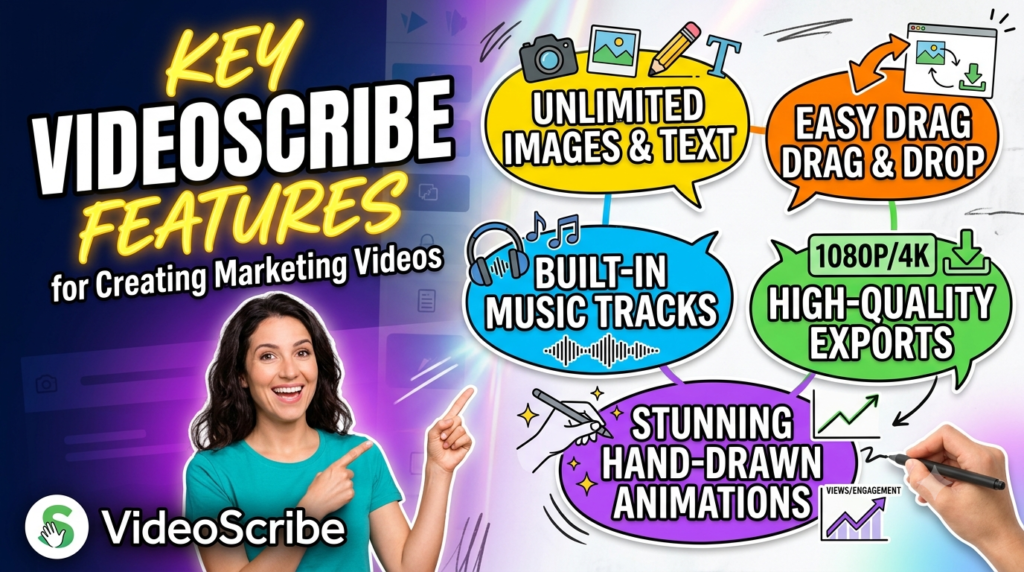
VideoScribe’s usefulness for marketers comes from combining animation creation, visual assets, audio, and AI-assisted functionality within the same creative environment. The platform’s current feature set includes AI-powered script generation, image generation, and voice-over creation. These tools address three major stages of video production: deciding what to say, finding or creating visuals to support the message, and producing narration. When those stages are connected more closely, a marketing team can potentially reduce the number of separate applications involved in its workflow.
This integrated approach matters because video creation can otherwise become fragmented. You might write your script in one application, source graphics from another platform, record audio somewhere else, and then bring everything together inside an editor. Every additional step introduces another opportunity for delays. VideoScribe does not eliminate the need for thoughtful creative direction—you still need a strong idea and a clear understanding of your audience—but its toolset can reduce some of the mechanical work required to transform that idea into an animated video.
Drag-and-Drop Video Creation and Built-In Media
The drag-and-drop approach is one of the platform’s most practical features for non-specialist creators. Instead of constructing every graphic from the ground up, marketers can work with existing visual resources and arrange elements on a canvas. VideoScribe’s current tutorials describe a built-in media library containing assets such as images, illustrations, icons, and music, while also allowing users to upload their own materials. This combination gives creators a starting point without completely restricting customization.
For a marketing department, this can support faster production of repeatable content. Imagine producing a weekly educational series for customers. You could maintain a recognizable visual structure while changing the script, illustrations, and examples for each episode. Similarly, an agency might develop different animated campaigns for clients without rebuilding every visual component manually. The important point is not simply that drag-and-drop editing is convenient. It changes who can participate in video production. Team members who understand the customer and campaign message but are not professional animators can become more directly involved in turning ideas into visual content.
AI-Powered Script, Image, and Voice-Over Generation
VideoScribe’s AI functionality represents one of the most significant developments in its current offering. The platform provides AI tools designed to assist with scripts, images, and voice-overs. Its script generator can create a starting script based on a topic or key information, while AI image generation can produce visuals from prompts. The AI voice-over functionality is designed to convert written scripts into narration, with options covering different voices, accents, languages, and tones. Together, these capabilities can help creators address common production bottlenecks without constantly moving between separate tools.
AI assistance is most useful when treated as a creative accelerator rather than an automatic replacement for marketing judgment. A generated script still needs to match your audience, brand voice, factual requirements, and campaign objectives. An AI-generated visual should still support the story rather than simply looking impressive. The same principle applies to voice-overs: the voice needs to fit the personality and emotional tone of the campaign. When marketers maintain that editorial control, AI tools can speed up routine production tasks while leaving strategic decisions in human hands.
Using AI to Speed Up the Marketing Content Workflow
Picture the traditional workflow for producing a short animated advertisement. Someone develops the concept, another person drafts the script, a designer creates or sources visuals, and a voice artist records narration. The project then moves into editing before multiple rounds of revisions begin. For large campaigns, that process may be appropriate, but it can be excessive for a small promotional video or rapidly changing social campaign. VideoScribe’s AI features offer a shorter path by helping creators generate an initial script, create supporting imagery, and produce voice-over audio within a connected workflow.
This can be particularly useful during experimentation. Suppose you are testing three different marketing angles for the same product. Rather than committing your entire production budget to a single concept, you could develop multiple animated variations and evaluate which message resonates most strongly. The real advantage is speed of iteration. Digital marketing rewards teams that can learn and adapt, and a faster content workflow gives marketers more opportunities to test creative ideas rather than treating every video as a large, irreversible production.
How VideoScribe Can Improve Marketing Engagement
Engagement begins with attention, but attention alone is not enough. A flashy video that viewers remember without understanding your message has limited marketing value. Effective animated marketing needs to capture interest while guiding the audience toward a specific idea, benefit, or action. VideoScribe’s visual storytelling approach can help marketers structure that journey by combining progressive animation with narration and text. Instead of presenting a dense explanation, the creator can break the message into a sequence of digestible visual moments.
This approach is particularly useful when the customer needs education before making a purchase. Some products are immediately understandable; others are not. A consumer probably does not need a three-minute explainer to understand what a coffee mug does. A cybersecurity platform, financial service, enterprise software product, or specialized consulting service may be different. Animation allows the marketer to create a visual bridge between an unfamiliar problem and the proposed solution. When viewers understand what you offer and why it matters, they are in a much better position to consider the next step.
Visual Storytelling for Product and Service Promotion
Strong marketing videos rarely begin by shouting a list of features. They usually begin with a situation the audience recognizes. A customer has a problem, encounters an obstacle, or wants to achieve something. The product then enters the story as a solution. VideoScribe’s animation format lends itself naturally to this structure because marketers can reveal each part of the narrative in sequence. A character can represent the customer, visual symbols can illustrate the problem, and movement can demonstrate how the solution changes the situation.
This style is especially helpful when promoting intangible services. You cannot physically film “better workflow efficiency” or “simplified data management” in the same way you can film a new pair of shoes. Animation gives abstract concepts a visual language. Time savings can become a clock, growth can become a rising graph, and complicated processes can become a simple path connecting one point to another. The best results come when these visuals clarify the message instead of decorating it. Every animated element should answer a simple question: does this help the viewer understand or remember what we are saying?
Creating Content for Social Media and Digital Campaigns
Social platforms demand flexibility because the same creative format does not fit every channel or campaign objective. VideoScribe currently allows creators to start projects using different aspect ratios, including landscape, square, and vertical formats. That flexibility can help marketers plan animated content for various placements instead of relying exclusively on a single traditional widescreen format.
The platform can therefore support several layers of a digital campaign. A longer animated explainer might introduce a product on a landing page or video platform, while shorter versions can highlight individual benefits for social media. A vertical animation might be developed for mobile-first viewing, while a square version could support another campaign placement. Marketers should still adapt the pacing and messaging for each platform rather than simply resizing identical content. Someone scrolling through a social feed has a different mindset from someone deliberately watching a detailed product demonstration. VideoScribe provides the production tools, but understanding those differences remains a strategic responsibility for the marketer.
VideoScribe for Different Marketing Use Cases
One reason VideoScribe can be valuable is that animated content is not limited to advertisements. Businesses communicate with people throughout the customer lifecycle, from initial awareness to product education and long-term retention. The same animation platform can therefore serve different objectives depending on how the story is structured. VideoScribe itself highlights use cases spanning marketing promotions, explainer videos, product demonstrations, training, and business communication.
For a small business, this versatility may be particularly attractive because purchasing and learning separate tools for every communication task can become inefficient. The marketing team could create a brand-awareness animation, the sales team could use an explainer during presentations, and the training department could develop onboarding material. Maintaining a consistent visual approach across these applications can also strengthen communication. The key is to treat the tool as a storytelling platform rather than assuming one animation style will automatically work for every audience.
Explainer Videos, Product Demos, and Brand Storytelling
Explainer videos are perhaps the most obvious marketing use case. If a potential customer reaches your website and cannot understand your product within a reasonable amount of time, you may lose that person’s attention before they ever reach your call to action. An animated explainer can compress the essential story into a short visual journey: here is the problem, here is why it matters, here is our solution, and here is what you should do next. VideoScribe specifically promotes its tools for animated and whiteboard explainers designed to communicate products, services, and concepts.
Product demonstrations can follow a similar approach, especially when the product involves a process rather than a physical object. Brand storytelling offers another opportunity. Instead of presenting corporate history as a timeline filled with dates, a company can animate key milestones and ideas. The same principle applies to campaign storytelling, customer journeys, and educational content. Animation gives marketers the ability to decide exactly what information appears and when, allowing them to build curiosity before revealing the final message.
Training, Internal Communications, and Customer Education
When someone becomes a customer, marketing doesn’t stop. Businesses also need to help people understand how to use products, adopt services, and remain engaged over time. Animated training and educational videos can support this post-purchase experience. VideoScribe promotes animated training as a reusable format that can support onboarding and on-demand learning across teams, while its visual and audio capabilities allow information to be delivered through a combination of graphics and narration.
Customer education can be equally important. If your product includes features that customers overlook, short animated tutorials can help demonstrate their value. Instead of repeatedly answering the same support question, a business might create an evergreen animated explanation. Internal teams can use similar content for employee onboarding, policy explanations, or process updates. Because animated assets can often be edited without organizing a complete live-action reshoot, this format can also be practical when information changes.
VideoScribe Pricing and Value for Marketers
As of the pricing information available during this research in July 2026, VideoScribe lists Lite, Core, and Max subscription tiers. The annual-billing figures displayed on its pricing page were $12.50 per month equivalent for Lite ($150 billed annually), $18.75 per month equivalent for Core ($225 annually), and $23.33 per month equivalent for Max ($280 annually). Because subscription pricing and included features can change, prospective customers should verify the latest terms directly on the official VideoScribe pricing page before purchasing. VideoScribe also currently advertises a seven-day free trial without requiring payment details, which can provide an opportunity to evaluate the workflow before committing to a subscription.
| Plan | Annual-Billing Price Shown During Research | Annual Total |
| Lite | $12.50/month equivalent | $150 |
| Core | $18.75/month equivalent | $225 |
| Max | $23.33/month equivalent | $280 |
The real value of a subscription depends on how frequently you create videos and what alternative production method you would otherwise use. A company that produces animated content regularly may evaluate the software differently from someone creating a single video. Marketers should consider not only subscription cost but also production time, available assets, AI usage, team requirements, export needs, and the cost of external creative resources. The best approach is to test the software with a genuine marketing project rather than an artificial demo. If you can efficiently create content that meets your brand standards and campaign goals, the platform’s value becomes much easier to judge.
Advantages and Limitations of VideoScribe
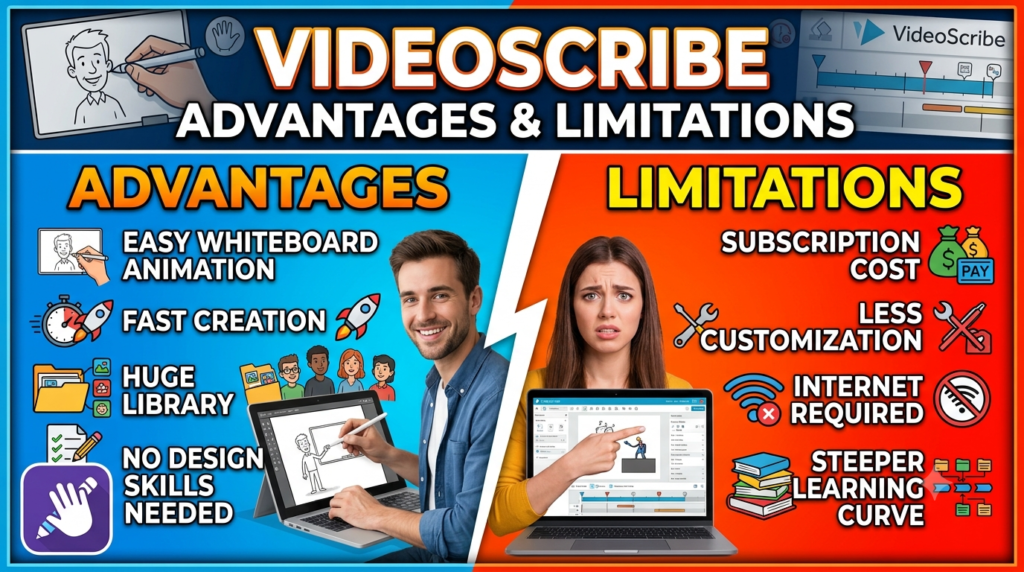
VideoScribe offers several meaningful advantages for marketers. It lowers the technical barrier to animated content creation, supports a recognizable whiteboard animation style, provides built-in media resources, and incorporates AI tools for scripts, images, and voice-overs. It can operate through the web or desktop environments on supported systems, giving users flexibility in how they work. The ability to create different types of animated content can also make it useful beyond pure advertising, including explainers, training, education, and internal communication.
At the same time, no tool is perfect for every creative project. Businesses seeking highly sophisticated character animation, cinematic visual effects, or frame-by-frame professional motion design may require more specialized software or professional production support. The recognizable whiteboard aesthetic can also become repetitive if every campaign follows exactly the same formula. Successful marketers therefore need to customize their visual approach, pacing, script, branding, and audio rather than relying on templates alone. AI-generated assets also require human review to ensure accuracy and brand consistency. VideoScribe is best understood as an accessible marketing animation platform, not a replacement for every possible video-production workflow.
Read More:-
Parcel ABC UK Shipping Guide: Features, Pricing, and Benefits Explained
Why Fun-sport-vision.com DE Is Gaining Popularity in Germany
Mashvisor (US): Complete Review for Real Estate Investors in 2026
What Is Scandic SE? A Complete Beginner’s Guide
Simpel NL Explained: Everything You Need to Know
Tips for Creating Better Animated Marketing Videos With VideoScribe
Creating an animated video is easy compared with creating an animated video people actually want to watch. The difference usually comes down to strategy. Start by identifying one primary message. If your video tries to explain fifteen benefits, seven features, your company history, and your latest promotion simultaneously, the viewer may remember none of them. Build the script around a clear audience problem and create a logical path toward your solution. Then use animation to reinforce that path rather than distracting from it.
Keep the relationship between visuals and narration tight. If the voice-over discusses customer frustration while the screen displays an unrelated decorative image, the animation is adding noise rather than clarity. Give important moments enough time to register, and use movement strategically. Brand consistency also matters: incorporate your visual identity where appropriate and maintain a recognizable tone across campaigns. Finally, create a clear call to action. After spending time explaining the problem and demonstrating your solution, tell viewers what should happen next—visit a landing page, request a demo, start a trial, contact the team, or explore the product.
Is VideoScribe the Right Animated Video Tool for Your Business?
VideoScribe is likely to appeal most strongly to businesses, marketers, educators, trainers, and content creators who want to produce animated communication without becoming professional animators. Its drag-and-drop approach, media resources, templates, whiteboard animation capabilities, and AI-assisted script, image, and voice-over tools can create a relatively accessible path from concept to finished content. The availability of both web and desktop options also gives creators flexibility depending on their preferred workflow.
Whether it is the “best” choice ultimately depends on your goals. A small marketing team producing regular explainers may value simplicity and speed above advanced animation control. A professional motion-design studio may have completely different priorities. Before subscribing, identify the type of content you plan to produce, how frequently you will create it, who will use the software, and which features matter most. Testing the current free trial with a real campaign concept is one of the most practical ways to determine whether VideoScribe fits your workflow.



Conclusion
VideoScribe has earned a strong position among accessible animated marketing tools because it addresses a genuine business challenge: creating visual content without turning every video into a complicated production project. Its whiteboard animation heritage gives marketers a distinctive way to explain ideas progressively, while its broader animation capabilities make it useful for promotions, product demonstrations, explainers, social content, customer education, and training.
The addition of AI script generation, AI image generation, and AI voice-over tools strengthens that proposition by bringing more stages of content creation into one workflow. Marketers can move from an initial idea toward a script, supporting visuals, narration, and animation with fewer disconnected production steps.
The platform will not replace advanced professional animation software for every project, nor should AI replace thoughtful marketing strategy. What VideoScribe can offer is accessibility. For teams that need to explain complicated ideas, tell visual stories, and produce animated marketing content more efficiently, it is a tool worth considering. The most effective results will still come from the fundamentals that technology cannot automate completely: understanding your audience, developing a focused message, telling a compelling story, and giving viewers a clear reason to act.
Frequently Asked Questions About VideoScribe
Q. What is VideoScribe mainly used for?
A. VideoScribe is an animated video creation platform that can be used for whiteboard animations, explainer videos, marketing promotions, product demonstrations, training materials, educational content, and other visual communications. It is designed to make animation creation more accessible to people who may not have professional animation experience.
Q. Does VideoScribe include AI tools?
A. Yes. VideoScribe currently offers AI-assisted script generation, image generation, and voice-over generation. These tools can help creators develop scripts, generate relevant visual assets, and create narration using different voice options.
Q. Can VideoScribe be used for social media marketing?
A. Yes. Marketers can use VideoScribe to create animated promotional and educational content for digital campaigns. The platform currently supports common project aspect ratios including 16:9, 1:1, and 9:16, which can help creators plan content for different viewing formats.
Q. Is VideoScribe suitable for beginners?
A. VideoScribe is designed around accessible video creation and provides features such as a drag-and-drop canvas, templates, built-in media resources, and optional AI tools. These capabilities can make it more approachable for beginners than professional animation applications that require extensive technical knowledge.
Q. Does VideoScribe offer a free trial?
A. At the time of this research, VideoScribe offers a seven-day free trial, and its help documentation states that payment details are not required to access the trial. Since offers can change, users should check the official website for the latest availability and conditions before signing up.