Discover how SurveySparrow can help businesses simplify surveys, collect meaningful customer and employee feedback, measure satisfaction, and turn responses into actionable insights. With conversational surveys, omnichannel distribution, automation, powerful analytics, and integrations with popular business tools, SurveySparrow provides a flexible solution for improving customer experience, employee engagement, market research, and decision-making. Whether you are a growing business or an established organization, SurveySparrow can make feedback collection more engaging, efficient, and valuable.
Table of Contents
- What Is SurveySparrow?
- 1. Create More Engaging Conversational Surveys
- 2. Collect Feedback Across Multiple Channels
- 3. Measure Customer Experience With NPS, CSAT, and CES
- 4. Strengthen Employee Feedback and Engagement
- 5. Automate Feedback Collection and Follow-Ups
- 6. Turn Survey Responses Into Actionable Insights
- 7. Integrate Surveys With Your Existing Business Tools
- 8. Build Flexible Surveys for Different Business Goals
- 9. Support Global and Multilingual Feedback Programs
- 10. Improve the Customer Feedback Loop
- SurveySparrow Pricing and Scalability
- SurveySparrow vs. Traditional Survey Methods
- How Businesses Can Get the Most From SurveySparrow
- Conclusion
- FAQs About SurveySparrow
What Is SurveySparrow?
SurveySparrow is an online survey and experience management platform designed to help organizations create surveys, distribute them through different channels, collect responses, and analyze feedback. Rather than treating every questionnaire as a static form, the platform emphasizes conversational surveys and multiple ways of engaging respondents, including email, web links, embedded surveys, SMS, QR codes, Slack, Microsoft Teams, mobile experiences, and other channels. Its current feature set also extends beyond basic questionnaires into customer experience programs, employee experience, NPS, CSAT, CES, 360-degree assessments, reporting, automation, workflows, APIs, and AI-assisted analysis. That breadth matters because businesses rarely have only one feedback requirement: a SaaS company may want post-support CSAT, an HR team may need employee pulse surveys, a product team may want feature feedback, and a marketing department may conduct market research during the same quarter. Instead of maintaining disconnected tools for every use case, businesses can use a single ecosystem to manage different feedback programs. SurveySparrow also currently advertises a free plan and a 14-day trial, allowing organizations to explore the platform before committing to a paid subscription. In practical terms, SurveySparrow is best viewed not simply as a form creator but as a central feedback layer that can connect questions, respondents, data, workflows, and business decisions.
How SurveySparrow Works for Modern Businesses
The basic process is straightforward: define what you want to learn, create a survey, select the audience, distribute it through an appropriate channel, collect responses, and analyze the results. What makes the approach more useful for businesses is the ability to add logic, automation, integrations, reporting, and experience-management capabilities around that basic process. For example, a company could send an NPS survey after a customer reaches a particular lifecycle milestone, collect the score and written explanation, segment the results, and then trigger an internal workflow for customers who need follow-up. SurveySparrow’s API and webhook capabilities can also help connect survey data to external applications, while its integrations cover platforms such as Salesforce, HubSpot, Slack, Zendesk, Intercom, Mailchimp, Google Sheets, Power BI, and many others. This makes the platform more interesting to operational teams because feedback does not have to remain trapped inside a survey dashboard. Instead, the information can become part of existing customer service, sales, marketing, HR, or product workflows. Think of the survey as the front door: the questions bring the information in, but integrations, automation, and analytics determine what happens after someone walks through that door.
1. Create More Engaging Conversational Surveys
One of the most distinctive benefits of SurveySparrow is its focus on conversational surveys, which are designed to feel more like an interaction than a traditional static questionnaire. SurveySparrow says its conversational interface can help customers achieve up to 40% higher completion rates, although businesses should treat that figure as a platform-reported claim rather than a universal guarantee because actual results depend on audience, survey design, topic, timing, and distribution. The underlying idea is simple: when a survey feels approachable, people may be more willing to continue answering questions rather than abandoning the process halfway through. This can be especially useful when asking customers for feedback after a purchase, support interaction, onboarding experience, event, or product trial, because respondents are more likely to participate when the experience feels lightweight and relevant. A well-designed conversational survey can also make the brand interaction feel less mechanical, which is important when a company is trying to strengthen relationships rather than merely collect numerical scores. The benefit goes beyond aesthetics because better engagement can potentially produce more complete responses and richer qualitative information. Of course, the design still matters enormously; a conversational interface cannot rescue a survey containing repetitive, irrelevant, or overly complicated questions. Used thoughtfully, though, SurveySparrow gives businesses another way to reduce the psychological friction between asking for feedback and actually receiving it.
Why Conversational Design Can Improve Participation
Survey fatigue is one of the quiet enemies of business feedback programs. Imagine asking a customer who has just resolved a support issue to navigate a long, rigid questionnaire filled with twenty unrelated questions; even a loyal customer may simply close the browser. A more conversational structure can make the experience feel like a sequence of manageable interactions, allowing businesses to keep the respondent focused on one decision at a time. SurveySparrow supports a broad range of question types and survey logic, allowing organizations to create more personalized experiences rather than forcing every respondent down exactly the same path. This matters particularly when different answers should lead to different follow-up questions; someone who gives a high satisfaction rating may need only a quick follow-up, while a dissatisfied respondent may need an opportunity to explain what went wrong. When surveys adapt to what respondents have already told you, the questionnaire can feel less like an interrogation and more like a conversation that has a purpose. The result is potentially better-quality feedback because respondents spend more of their limited attention answering questions that are relevant to them. In other words, conversational design is not just about making surveys look modern; it is about respecting the respondent’s time and creating a smoother path from first question to useful insight.
2. Collect Feedback Across Multiple Channels
Another major advantage is omnichannel feedback collection. Customers and employees do not all behave the same way, so relying on a single distribution channel can unnecessarily limit participation. SurveySparrow supports multiple collection methods, including email, SMS, web links, social sharing, embedded surveys, QR codes, Slack, Microsoft Teams, mobile SDK experiences, and offline options. This flexibility allows a business to match the feedback method to the context rather than forcing every respondent into the same channel. A restaurant might use a QR code after a meal, an online retailer could send a post-purchase email, a software company could display an in-app micro-survey, and an internal HR team might use Slack or Teams for a quick employee pulse check. The advantage becomes particularly clear for organizations with customers spread across different digital touchpoints because feedback collection can happen closer to the moment when an experience actually occurs. That timing can improve the relevance of responses: asking someone immediately after customer support is different from asking them three months later when details have faded. SurveySparrow’s omnichannel approach therefore helps businesses treat feedback as an ongoing activity rather than a once-a-year research project. When the organization can meet respondents where they already are, gathering a steady stream of feedback becomes much easier to incorporate into everyday operations.
Connecting Email, Web, Mobile, SMS, and More
Different channels are useful for different situations, and a good feedback strategy should recognize that reality. Email works well for structured post-purchase or relationship surveys, while web embeds can capture opinions during product journeys, and QR codes can make physical locations part of a digital feedback program. SurveySparrow’s platform documentation lists sharing options that include web, mobile, social, email, SMS, QR codes, Slack, Teams, embedded experiences, and other methods, giving teams considerable flexibility in how they reach respondents. The benefit is not simply having a long list of channels; it is being able to design a feedback journey around the customer’s actual experience. Consider a hotel guest who receives a quick satisfaction question through a mobile interaction during a stay, followed later by a broader relationship survey after checkout. Or consider an employee who receives a short weekly pulse survey through an internal communication tool instead of having to remember to visit a separate portal. These small differences can determine whether feedback becomes part of someone’s natural routine or another administrative task they postpone forever. For businesses, that means more opportunities to capture feedback at the right moment, from the right audience, through the right channel.
3. Measure Customer Experience With NPS, CSAT, and CES
Businesses often collect feedback without knowing which metrics should guide the conversation. SurveySparrow supports established customer experience measurements such as Net Promoter Score (NPS), Customer Satisfaction Score (CSAT), and Customer Effort Score (CES), allowing organizations to examine customer relationships from several angles. NPS is generally used to understand customer willingness to recommend a company, CSAT focuses on satisfaction with a particular interaction or experience, and CES looks at how much effort customers had to expend to accomplish something. These metrics answer different questions, which is why combining them can create a more useful picture than relying on a single number. A customer might be generally loyal to a company while still finding its support process frustrating, for example, and CES could expose that friction even when overall NPS remains healthy. SurveySparrow can automatically calculate these measures and provide reporting around the responses, helping teams move from raw questionnaire answers to standardized indicators. This makes it easier for executives, customer success teams, support leaders, and product managers to speak a common measurement language. The key is not to chase impressive scores for their own sake but to use the metrics as signals that point toward deeper questions about what customers experience, value, dislike, or struggle with.
4. Strengthen Employee Feedback and Engagement
Customer feedback gets plenty of attention, but employee feedback can be equally important because employees experience internal processes every day. SurveySparrow supports employee pulse surveys, employee experience programs, and 360-degree assessments, giving organizations tools for gathering feedback about workplace experiences and individual development. Regular pulse surveys can help leaders detect changes in morale or workplace sentiment before those issues become larger problems, while 360-degree assessments can provide a broader view of an employee’s strengths and development opportunities. The value of frequent employee feedback is that it turns workplace listening into an ongoing conversation rather than an annual event. Employees can provide input about communication, management, collaboration, workload, workplace processes, or organizational initiatives while those experiences are still fresh. Managers can then use the information to identify patterns across teams instead of relying solely on individual conversations or assumptions. A successful employee feedback program still requires trust, transparency, and appropriate anonymity practices, because employees will not provide honest information if they believe every critical response will be traced back to them. SurveySparrow supplies the technological infrastructure, but leadership behavior determines whether the feedback becomes meaningful. When organizations genuinely act on what employees say, surveys stop being symbolic exercises and become part of a healthier feedback culture.
Using Pulse Surveys and 360-Degree Assessments
Pulse surveys are particularly useful because they can be shorter and more frequent than traditional employee engagement questionnaires. Instead of asking employees to complete a huge survey once every twelve months, a business can periodically ask a handful of targeted questions and monitor changes over time. SurveySparrow also provides 360-degree assessment functionality designed to collect feedback from multiple perspectives around an employee, supporting a broader approach to professional development. This can help organizations identify gaps between self-perception and how colleagues, managers, or other stakeholders experience someone’s work. The important distinction is that the objective should be development rather than punishment; feedback is most useful when employees understand how it will be interpreted and what actions may follow. Businesses can also use recurring survey functionality to establish consistent measurement rather than treating feedback as a special event. Over time, those repeated measurements can reveal whether a leadership initiative actually improved employee sentiment or whether a workplace change introduced new friction. In that sense, pulse surveys work much like a business dashboard: one reading may be interesting, but a series of readings reveals the direction in which the organization is moving.
5. Automate Feedback Collection and Follow-Ups
Automation is another reason SurveySparrow can be useful for growing businesses. Manually sending surveys, checking responses, exporting spreadsheets, identifying unhappy customers, and notifying the right employee can quickly become a tedious operational burden. SurveySparrow supports workflows, APIs, webhooks, integrations, and automated survey triggers, allowing teams to configure certain actions instead of repeatedly performing them by hand. A company could, for instance, establish a process in which feedback is collected after a customer interaction, low scores are flagged, and relevant information is passed to another business system. Recurring surveys can also help teams measure customer or employee sentiment at regular intervals without requiring someone to remember to launch each survey manually. This creates a major efficiency advantage because feedback becomes part of the organization’s operating system rather than another item on an employee’s to-do list. Automation can also improve consistency: the same trigger, timing, and follow-up process can be applied across thousands of interactions. The best automation strategy, however, is selective; not every response needs an elaborate workflow, and over-automation can make customer communication feel robotic. The goal is to automate repetitive mechanics while keeping human judgment where empathy, context, and problem-solving matter most.
6. Turn Survey Responses Into Actionable Insights
Collecting thousands of responses sounds impressive until someone opens a spreadsheet and realizes they have thousands of opinions but no clear idea what to do next. SurveySparrow addresses this challenge with reporting, dashboards, filters, cross-tabulation, exports, and newer AI-powered capabilities designed to help teams interpret feedback more efficiently. Its current platform describes CogniVue as a capability for surfacing themes, sentiment, key drivers, and emerging trends, while Co-Pilot is positioned as a conversational AI interface that can summarize survey data and provide recommendations. The practical benefit is that analysis can become less dependent on manually reading every open-text response. A product manager could look for recurring complaints about a feature, a customer experience leader could examine drivers associated with satisfaction, and an executive could review summarized patterns before a strategic meeting. SurveySparrow’s reporting features also allow users to filter responses and compare data based on different attributes, helping teams look beyond a single overall average. This matters because averages can hide important differences between customer groups, regions, products, channels, or stages of the customer journey. The real value of survey software therefore appears after collection: the better the platform helps a team transform raw answers into patterns and priorities, the more likely those answers are to influence real business decisions.
Real-Time Reporting and AI-Powered Analysis
Real-time analysis can shorten the distance between a problem appearing and someone noticing it. SurveySparrow’s reporting capabilities allow businesses to examine incoming responses, filter data, compare results, and schedule reports, while its current AI features are designed to identify themes, sentiment, key drivers, and trends from feedback. Imagine a customer support team suddenly seeing a spike in negative comments related to a billing process; instead of discovering the issue weeks later during a quarterly review, the team could potentially identify the pattern while it is still developing. AI does not eliminate the need for human interpretation, but it can reduce the time required to organize large volumes of unstructured feedback. This is especially valuable when open-ended questions produce hundreds or thousands of comments that would otherwise require manual categorization. Businesses should still validate AI-generated summaries and recommendations against the underlying responses because automated interpretation can miss context or misunderstand unusual wording. Used as an analytical assistant rather than an unquestioned decision-maker, AI can help teams spend less time sorting information and more time deciding what action deserves attention. That distinction is crucial: the goal is not to replace human judgment but to give decision-makers a clearer, faster view of what their respondents are saying.
7. Integrate Surveys With Your Existing Business Tools
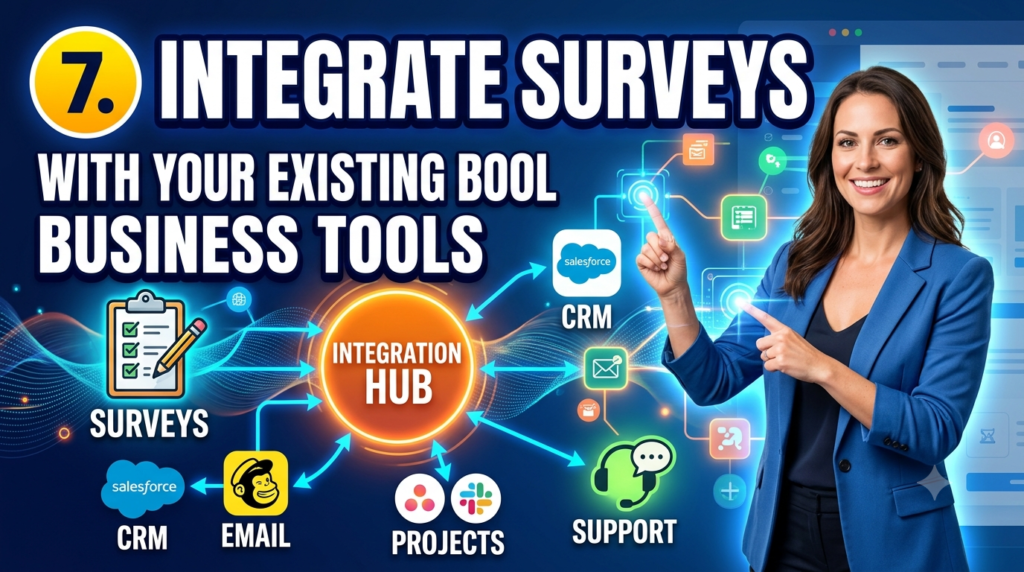
Survey software becomes substantially more valuable when it connects with the systems a company already uses. SurveySparrow provides integrations and technical connectivity for tools and platforms including Salesforce, HubSpot, Zendesk, Slack, Intercom, Mailchimp, Google Sheets, Power BI, Zapier, and others, while its API and webhook capabilities can support more customized connections. This means feedback can potentially move into the workflows where teams already work instead of creating another isolated data silo. For sales teams, survey responses can complement CRM information; for support teams, customer feedback can be connected with service processes; for marketing teams, survey insights can feed segmentation or campaign decisions; and for leadership teams, reporting data can be visualized alongside other business metrics. SurveySparrow’s current support documentation lists a wide range of integration guides, including Power BI, Salesforce, Zendesk, Microsoft Teams, Intercom, HubSpot, Google Sheets, Shopify, Jira, Snowflake, BigQuery, and Microsoft Fabric. The result can be a more connected feedback ecosystem where customer opinions are treated as operational data rather than a separate research archive. For larger organizations especially, this integration capability can reduce manual exports, duplicate data entry, and the risk that important feedback gets forgotten simply because it lives in the wrong application.
8. Build Flexible Surveys for Different Business Goals
Not every survey should look the same, and businesses often need more than a basic multiple-choice questionnaire. SurveySparrow supports different survey formats and use cases, including conversational surveys, NPS surveys, offline surveys, 360 assessments, quizzes, forms, customer experience surveys, employee feedback, and research-oriented programs. That flexibility can be useful for organizations that want one platform to support multiple departments without forcing every team into an identical workflow. Marketing might use a survey to research buyer preferences, product teams might ask customers to evaluate a new feature, HR could run an employee pulse check, and customer success could measure relationship health through NPS. Advanced logic and question types can also make questionnaires more relevant by changing what respondents see based on their previous answers. The platform’s Business plan currently lists features such as custom branding, advanced question types, workflows and webhooks, and respondent location tracking, while Enterprise adds capabilities such as CSS customization, automated translation to 130 languages, custom dashboard widgets, and key driver analysis. This range allows businesses to begin with straightforward surveys and introduce more sophisticated capabilities as their feedback program matures. Rather than buying a highly specialized tool for every new research requirement, companies can potentially expand their use of the same platform as their needs become more complex.
9. Support Global and Multilingual Feedback Programs
Global businesses face a simple but important challenge: customers do not all speak the same language. Asking respondents to complete an important survey in a language they are not comfortable with can introduce friction and potentially reduce the quality of the answers. SurveySparrow supports multilingual surveys, and its Enterprise offering currently advertises automatic translation to 130 languages. This can make the platform useful for companies serving customers, employees, or research participants across different regions. Multilingual capability is not merely a convenience; it can help organizations design feedback programs that are more inclusive and geographically representative. A global brand, for example, can gather feedback from multiple markets without forcing every respondent into an English-first experience. It also becomes easier to maintain standardized survey objectives while adapting the respondent-facing experience to local languages. Businesses should still review translations for cultural context, industry terminology, and regional nuances, particularly when surveys influence high-stakes decisions. When handled carefully, multilingual surveying can help organizations hear from a broader audience and compare feedback across markets without sacrificing the respondent experience.
10. Improve the Customer Feedback Loop
A survey only creates value when something happens after the response. One of the strongest reasons to use a dedicated feedback platform is the ability to create a repeatable closed-loop feedback process in which businesses collect opinions, identify problems, respond to customers, and use the lessons to improve future experiences. SurveySparrow’s platform includes workflows, automation, reporting, integrations, and ticket-management capabilities intended to help organizations move from feedback collection toward action. Consider a dissatisfied customer who gives a low CSAT score and explains that a support issue remained unresolved; that response should ideally not disappear into a dashboard. It should reach someone who can investigate the problem, communicate with the customer, and identify whether the underlying process needs improvement. This is where feedback becomes much more than a metric. The customer sees that their opinion matters, employees receive information about what needs fixing, and leadership gains evidence about recurring operational weaknesses. Over time, a strong closed-loop process can create a virtuous cycle: better listening leads to better action, better action improves experiences, and improved experiences generate stronger customer relationships. SurveySparrow can provide the technological foundation for that cycle, but the business still has to supply the most important ingredient—an organizational willingness to act on what the feedback reveals.
SurveySparrow Pricing and Scalability
SurveySparrow currently offers several plans designed around different usage levels, team sizes, and feature requirements. Its pricing page lists a free option with limited usage, while paid tiers include Basic, Starter, Business, and Enterprise; the current Business plan is positioned for teams needing collaboration, custom branding, advanced question types, workflows, and webhooks. The published pricing structure currently shows annual-billing response allowances of 2,500 for Basic, 15,000 for Starter, and 36,000 for Business, while Enterprise uses customized limits. The platform also advertises a 14-day trial that provides access to Business-level features with a response limit during the trial, allowing prospective users to test the platform before choosing a long-term plan. This tiered structure can make SurveySparrow relevant to different stages of business growth, although companies should evaluate their expected response volume, number of users, integrations, analytics needs, security requirements, and desired experience-management features before choosing a plan. Pricing and feature limits can change, so businesses should verify the current commercial terms directly with SurveySparrow before purchasing. For organizations scaling a feedback program from a handful of questionnaires to a company-wide listening system, the ability to move into higher usage limits and more advanced capabilities can be an important consideration.
SurveySparrow vs. Traditional Survey Methods
Traditional survey methods are not necessarily bad; they simply become difficult to manage as feedback programs grow. A small business might be perfectly comfortable sending a basic questionnaire and manually reviewing the results, but that approach can become cumbersome when feedback arrives from thousands of customers across several channels. Spreadsheet-based processes also make automation, segmentation, recurring surveys, advanced reporting, integrations, and centralized customer experience measurement more difficult to maintain. SurveySparrow brings those functions together in a platform designed around survey creation, distribution, analytics, automation, and experience management. Its current feature set includes real-time reports, omnichannel collection, workflows, integrations, dashboards, and AI-supported feedback analysis. The difference is similar to moving from keeping receipts in a drawer to using an accounting system: both can store information, but the second approach gives you tools for organizing, analyzing, and acting on it. That does not mean every company needs an advanced platform; businesses with very simple feedback requirements may find a basic form tool sufficient. For organizations where customer or employee feedback directly influences product development, retention, service quality, or strategic decisions, however, a more structured system can offer considerably more value.
| Area | Traditional Manual Surveys | SurveySparrow |
| Survey creation | Basic questionnaires | Conversational and advanced survey options |
| Distribution | Often limited to selected channels | Email, web, SMS, QR, Slack, Teams, mobile, and more |
| Customer metrics | Often manually calculated | NPS, CSAT, CES and related reporting |
| Automation | Usually requires manual work | Workflows, triggers, APIs, and webhooks |
| Analytics | Spreadsheet-oriented | Dashboards, filters, reports, and AI-assisted analysis |
| Integrations | Often limited | CRM, helpdesk, communication, analytics, and other integrations |
| Employee feedback | Usually separate process | Pulse surveys and 360 assessments |
| Scalability | Increasingly difficult manually | Plans and capabilities designed for different business sizes |
How Businesses Can Get the Most From SurveySparrow
The technology itself will not automatically produce valuable feedback; the quality of the program depends heavily on how businesses design and use it. Start by defining the decision you want the survey to inform before writing a single question. If the goal is to understand why customers cancel, ask questions that illuminate the cancellation journey rather than collecting dozens of unrelated demographic details. Keep surveys focused, use logic to avoid unnecessary questions, select the distribution channel that fits the customer journey, and make it clear why the respondent’s feedback matters. SurveySparrow’s reporting and integration capabilities become much more useful when teams establish clear ownership for acting on results rather than simply measuring scores. It is also wise to create a consistent measurement cadence, because one survey provides a snapshot while repeated surveys reveal trends. Teams should review both quantitative scores and qualitative comments because a numerical rating tells you what happened while an open-ended response may explain why. Finally, close the loop whenever practical: acknowledge useful feedback, communicate improvements, and show customers or employees that their participation produced something tangible. The strongest SurveySparrow implementation is therefore not the one with the most questions or the fanciest dashboard; it is the one that creates a reliable connection between what people say and what the business does.
Read More:-
How Does Strikingly Simplify the Website Building Process?
Building Your Dream Website with Site123
Boost Your E-commerce Strategy with YITH Plugins
Maximize Your Customer Engagement with LiveAgent’s Features
Why STRIPO is Essential for Digital Product Marketersa
Best Practices for Better Survey Results
Good survey design is ultimately an exercise in respect. Respect the respondent’s time by asking only questions that serve a clear purpose, respect their attention by avoiding unnecessary repetition, and respect their intelligence by explaining why their feedback matters. Use simple language instead of corporate jargon, make rating scales consistent, and avoid questions that push respondents toward a preferred answer. When possible, use survey logic to personalize the journey so that respondents do not waste time answering questions that are irrelevant to their situation. SurveySparrow’s combination of question types, logic, conversational design, multiple distribution methods, and reporting gives businesses the tools to implement these principles at scale. After collecting responses, segment the results by meaningful business dimensions such as customer type, product, region, lifecycle stage, or interaction type, provided the sample size supports useful comparisons. Then connect the findings to an action plan: which issue deserves attention first, who owns it, what change will be made, and how will the company know whether the change worked? That last question is especially important because feedback should create a learning loop rather than a graveyard of reports. When businesses consistently connect survey results to measurable action, the survey stops being an isolated research activity and becomes part of continuous improvement.



Conclusion
The top benefits of using SurveySparrow for business surveys and feedback extend far beyond creating attractive questionnaires. Its conversational survey approach can make feedback experiences more engaging, while omnichannel distribution helps businesses reach customers and employees through channels that fit their everyday behavior. NPS, CSAT, and CES capabilities provide established ways to measure customer experience, while employee pulse surveys and 360-degree assessments extend feedback programs into the workplace. Automation, APIs, webhooks, integrations, real-time reporting, dashboards, and AI-powered analysis can then help organizations move from collecting responses to understanding and acting on them. The platform’s current plans range from a limited free option through paid tiers and Enterprise capabilities, giving organizations different paths depending on response volume, users, collaboration, customization, and analytical requirements. Ultimately, the biggest advantage of SurveySparrow is the possibility of building a repeatable feedback system instead of running disconnected surveys whenever someone remembers to ask a question. Businesses that define clear objectives, respect respondent time, analyze both numbers and comments, integrate feedback with existing workflows, and consistently act on what they learn are likely to get far more value from the platform than organizations that simply send surveys and watch response counts. When used as part of a genuine listening culture, SurveySparrow can help turn customer and employee opinions into a practical source of insight for better decisions, stronger experiences, and continuous business improvement.
FAQs About SurveySparrow
Q. What is SurveySparrow mainly used for?
A. SurveySparrow is used for creating and distributing surveys, collecting feedback, measuring customer and employee experiences, analyzing responses, and automating feedback-related workflows. Its current capabilities cover traditional surveys as well as NPS, CSAT, CES, employee pulse surveys, 360 assessments, forms, research, and other experience-management use cases. This makes it suitable for teams that want to collect feedback from customers, employees, prospects, event participants, or other audiences. Businesses can also connect SurveySparrow with other applications so feedback can become part of existing operational workflows rather than remaining isolated inside the survey platform.
Q. Can SurveySparrow be used for employee feedback?
A. Yes. SurveySparrow supports employee feedback use cases including pulse surveys and 360-degree assessments. Organizations can use shorter recurring surveys to understand employee sentiment and broader assessment processes to gather feedback about performance and development. The effectiveness of an employee feedback program depends heavily on trust, survey design, privacy practices, and whether leaders actually act on the results. The platform provides the tools, but the organization needs to create an environment where employees feel comfortable giving honest feedback.
Q. Does SurveySparrow support integrations?
A. Yes. SurveySparrow provides integrations, APIs, and webhooks that can connect survey data with other business applications. Its current documentation lists integrations involving platforms such as Salesforce, HubSpot, Zendesk, Slack, Microsoft Teams, Intercom, Google Sheets, Power BI, Shopify, Jira, Snowflake, BigQuery, and others. The exact integration and feature availability can depend on the SurveySparrow plan and the specific application. Businesses with complex workflows should review the current integration documentation before selecting a plan.
Q. Does SurveySparrow have a free plan?
A. Yes. SurveySparrow currently offers a free plan with usage limitations, along with a 14-day trial for exploring paid functionality. Its pricing page currently lists the free plan with limited responses, active surveys, and questions, while the trial provides access to Business-plan features subject to a trial response limit. Because pricing and plan limits can change, companies should check the current SurveySparrow pricing page before making a purchasing decision. A free option can nevertheless be useful for testing the platform with a small feedback project before scaling up.
Q. Is SurveySparrow suitable for large businesses?
A. SurveySparrow can support larger organizations through higher-tier plans and enterprise-oriented capabilities. The current Enterprise offering includes customized usage limits, advanced customization, automated translation to 130 languages, custom dashboard widgets, key driver analysis, and additional integration options, with dedicated customer success support. Large organizations should evaluate the platform against their requirements for response volume, security, governance, integrations, analytics, user management, and support. The right solution ultimately depends on the complexity of the organization’s feedback program rather than company size alone.