Benzinga Pro is a powerful real-time market news and research platform designed for traders and investors who need fast, actionable insights. This guide explores Benzinga Pro’s key features, pricing, benefits, and step-by-step setup process to help beginners navigate the platform with confidence. Learn how to use real-time news feeds, stock scanners, custom alerts, and watchlists to make smarter trading decisions and maximize your market opportunities.
What Is Benzinga Pro?
Benzinga Pro is a subscription-based trading platform built around one simple objective: delivering market-moving news faster than traditional financial media. It combines breaking news, analyst ratings, SEC filings, earnings announcements, stock scanners, calendars, and customizable alerts into a single workspace. Instead of constantly switching between several websites, traders can monitor everything in one dashboard. The platform is particularly popular among day traders, swing traders, options traders, and active investors who rely on speed when making decisions.
Why Traders Use Benzinga Pro
The biggest advantage of Benzinga Pro is speed. Financial markets react instantly to breaking news, earnings reports, FDA approvals, analyst upgrades, mergers, and government announcements. Receiving these updates even a few seconds earlier can make a significant difference for active traders. Benzinga Pro also allows users to customize alerts so they only receive notifications for stocks or events that matter to them.
Who Should Use Benzinga Pro?
Benzinga Pro is suitable for:
- Beginner traders learning market news
- Day traders
- Swing traders
- Options traders
- Active investors
- Momentum traders
Long-term investors may not require every advanced feature, but they can still benefit from real-time earnings updates, analyst ratings, and economic calendars.
Key Features of Benzinga Pro
One reason Benzinga Pro has become a favorite among active traders is the variety of tools available in one platform. Rather than overwhelming beginners, think of these features as building blocks. You can start with just one or two and gradually explore the others as your experience grows.
Real-Time News Feed
The News Feed is the heart of Benzinga Pro. It delivers live financial headlines covering earnings releases, analyst upgrades and downgrades, mergers and acquisitions, economic announcements, SEC filings, insider transactions, and company-specific news. Because the feed updates in real time, traders can react to information before it becomes widely discussed.
Stock Scanner
The Stock Scanner automatically searches the market for stocks that match selected criteria. Beginners can filter stocks by:
- Price
- Volume
- Percentage gainers
- Percentage losers
- Float
- Market capitalization
- Relative volume
Instead of manually reviewing thousands of stocks, the scanner highlights only those meeting your conditions.
Audio Squawk
One of Benzinga Pro’s signature features is Audio Squawk. Instead of reading every headline, professional announcers read important news aloud in real time. This allows traders to focus on charts while still staying informed about breaking events.
Watchlists and Alerts
Watchlists allow you to monitor selected stocks throughout the day. Additionally, you can set up alerts based on:
- Price changes
- Breaking news
- Analyst ratings
- Unusual volume
- Earnings announcements
These notifications reduce the need to constantly monitor charts.
Benzinga Pro Pricing and Plans
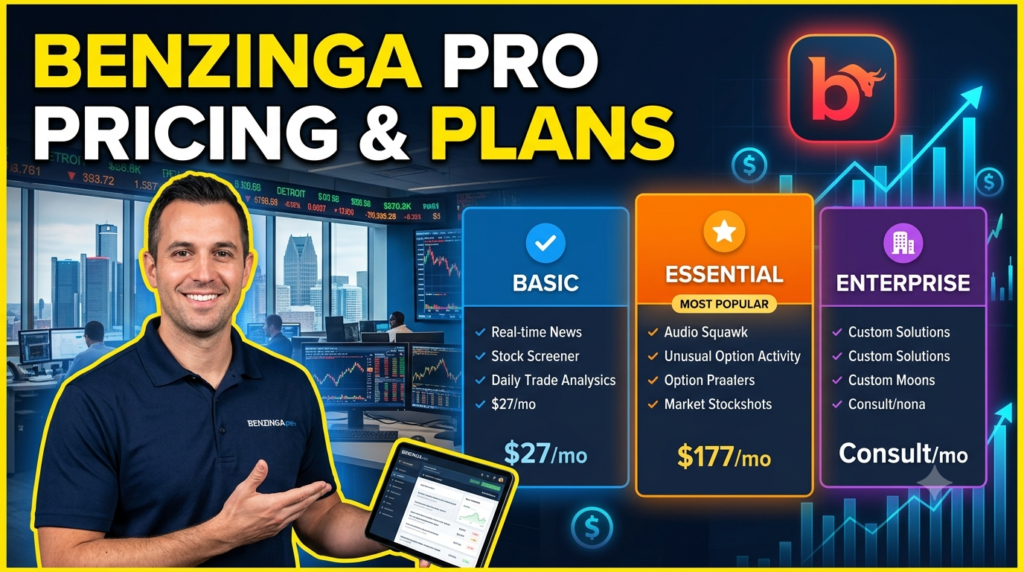
Pricing changes occasionally, so it’s always best to verify current plans on the official pricing page. As of the latest available information, Benzinga Pro offers multiple subscription tiers designed for different types of traders. The Basic plan starts at approximately $37 per month, while the Essential plan includes advanced tools such as AI features, scanners, and additional functionality at a significantly higher monthly price.
| Plan | Best For | Highlights |
| Basic | Beginners | Real-time news, essential market coverage |
| Essential | Active Traders | AI features, advanced scanners, alerts, more customization |
Basic Plan
The Basic plan is usually enough for beginners who primarily want fast market news and a simple interface without advanced trading tools.
Essential Plan
The Essential plan adds advanced scanners, AI-powered features, more customization, and enhanced trading workflows for active traders.
Which Plan Is Best for Beginners?
Starting with the Basic plan makes sense for the majority of new users. As your experience grows, you can upgrade if you find yourself relying heavily on advanced scanners and premium alerts.
Step-by-Step Guide to Getting Started
Step 1: Create Your Account
Visit the official Benzinga Pro website and choose a subscription plan that fits your needs. Complete registration using your email address and payment information. New users should also check whether a free trial or promotional offer is currently available before subscribing.
Step 2: Customize Your Dashboard
After logging in, you’ll notice that Benzinga Pro allows you to arrange windows according to your workflow. Beginners should keep the layout simple:
- News Feed
- Watchlist
- Stock Scanner
- Calendar
Avoid filling your screen with unnecessary widgets during your first few weeks.
Step 3: Set Up Alerts and Watchlists
Create a watchlist containing companies you regularly follow. Then configure alerts for important events such as:
- Price breakouts
- Analyst upgrades
- Earnings reports
- Breaking news
These alerts help ensure you never miss important developments.
Step 4: Combine News with Scanners
One common beginner mistake is relying only on stock scanners or only on news. The best results come from combining both. For example, if the scanner identifies unusual volume and the News Feed simultaneously reports positive earnings, that stock deserves closer attention.
Beginner Tips to Maximize Benzinga Pro
Learning to trade isn’t about collecting dozens of indicators or chasing every headline. Start with one strategy and become comfortable before adding more complexity. Spend time each day reviewing the News Feed to understand how markets respond to breaking events. Over time, you’ll begin recognizing patterns between news releases and stock price movements.
Another valuable habit is reviewing your trades. Compare your entries with the news that triggered them and identify what worked well or what could be improved. Consistency matters far more than constantly changing strategies.
Pros and Cons
| Pros | Cons |
| Extremely fast news delivery | Premium plans can be expensive |
| Highly customizable workspace | Learning curve for beginners |
| Excellent stock scanners | Best suited for active traders |
| Audio Squawk saves time | Not a brokerage platform |
| Custom alerts and calendars | Some advanced tools require higher-tier plans |
Read More:-
Parcel ABC UK Shipping Guide: Features, Pricing, and Benefits Explained
Why Fun-sport-vision.com DE Is Gaining Popularity in Germany
Mashvisor (US): Complete Review for Real Estate Investors in 2026
What Is Scandic SE? A Complete Beginner’s Guide
Simpel NL Explained: Everything You Need to Know
Benzinga Pro vs Other Trading Research Platforms
Compared with traditional financial news websites, Benzinga Pro focuses on delivering actionable information as quickly as possible. While platforms such as Bloomberg Terminal provide even broader institutional-level data, they are far more expensive. Other research services emphasize long-term investment analysis rather than real-time trading opportunities.
For beginners interested in active trading, Benzinga Pro strikes a balance between affordability and professional-grade functionality. It offers fast news, scanners, alerts, and customizable workspaces without requiring institutional budgets.
Final Verdict
Benzinga Pro is one of the strongest platforms available for traders who rely on speed, timely news, and customizable market intelligence. Beginners may initially find the interface busy, but by focusing on the News Feed, Watchlists, and basic alerts, they can quickly become comfortable with the platform. As experience grows, advanced scanners, AI tools, and Audio Squawk can be added to improve trading efficiency.
The platform isn’t designed to guarantee profitable trades or replace sound risk management. Instead, it provides information faster, allowing traders to make informed decisions with greater confidence. If your trading style depends on reacting quickly to market-moving events, Benzinga Pro is worth considering.




Conclusion
Getting started with Benzinga Pro doesn’t require years of trading experience. By learning one feature at a time, customizing your workspace, and building disciplined trading habits, you can turn a sophisticated professional platform into an accessible daily research tool. Real-time news, customizable alerts, stock scanners, and Audio Squawk work together to help traders stay informed in rapidly changing markets. Remember that successful trading depends not only on receiving information quickly but also on managing risk, following a strategy, and continuously improving your decision-making process. With patience and consistent practice, Benzinga Pro can become an essential part of your trading toolkit.
Frequently Asked Questions
Q. Is Benzinga Pro suitable for complete beginners?
A. Yes. Beginners can start with the News Feed, Watchlists, and Alerts before exploring advanced scanners and AI features.
Q. Does Benzinga Pro offer a free trial?
A. Availability varies over time. Check the official website for the latest trial and promotional offers.
Q. Can I trade directly through Benzinga Pro?
A. No. Benzinga Pro is primarily a research and market intelligence platform, not a brokerage.
Q. Which subscription plan should beginners choose?
A. The Basic plan is generally sufficient for new traders who mainly need real-time news and essential research tools.
Q. Is Benzinga Pro worth the price?
A. For active traders who rely on fast news and market-moving events, many users find the platform valuable. Casual long-term investors may not need every premium feature.