Buddy Punch: Your All-in-One Time Tracking Tool
Tracking employee time accurately might sound simple, but any business owner or manager knows it’s one of the biggest challenges in workforce management. Buddy Punch is a powerful employee time tracking and scheduling tool that has grown rapidly in popularity for businesses of all sizes, especially small and mid-sized teams looking to ditch manual timesheets and outdated punch clocks. Instead of paperwork and spreadsheets, Buddy Punch brings real-time tracking, insights, and automation into a single, easy-to-use platform that works on web, desktop, and mobile devices.
Table of Contents
- Buddy Punch: Your All-in-One Time Tracking Tool
- What Is Buddy Punch and Why It Matters
- Core Time Tracking Features That Make Buddy Punch Stand Out
- Real-Time Accountability: GPS and Geofencing
- Scheduling and Attendance Management Simplified
- PTO Tracking and Time Off Requests
- Payroll Integration and Automation
- User Experience: Interface and Accessibility
- Practical Use Cases Across Industries
- Benefits for Managers and Business Leaders
- Common Drawbacks and Limitations
- How Buddy Punch Stacks Up Against Competitors
- Pricing Overview and Cost-Effectiveness
- Real User Feedback: What Customers Say
- Implementing Buddy Punch in Your Organization
- Best Practices for Getting the Most Out of Buddy Punch
- Frequently Asked Questions About Buddy Punch
- Looking to the Future: Updates and Innovations
- Summary – Buddy Punch in a Nutshell
- Conclusion
- Frequently Asked Questions (FAQs)
What Is Buddy Punch and Why It Matters
Time tracking hasn’t always been as intuitive or efficient as it could be. Traditional methods—paper timecards, punch-in sheets, even spreadsheets—are error-prone and can lead to unintended payroll mistakes. Buddy Punch was created to solve exactly that problem. Today, it’s recognized as a cloud-based solution that helps businesses track employee hours, attendance, PTO, and payroll-ready timesheets without the hassle.
Whether you’re managing remote workers, field teams, or office staff, Buddy Punch provides a central platform to capture time accurately and ensure workers are paid correctly for the hours they put in. That’s why it’s become such a valuable tool for organizations that need accountability and simplicity in one place.
Core Time Tracking Features That Make Buddy Punch Stand Out
One of the most praised aspects of Buddy Punch is its robust feature set. It’s not just a clock-in/clock-out system—it’s an intelligent time tracking ecosystem designed to give businesses better visibility and control over labor hours.
Clocking In/Out Made Easy
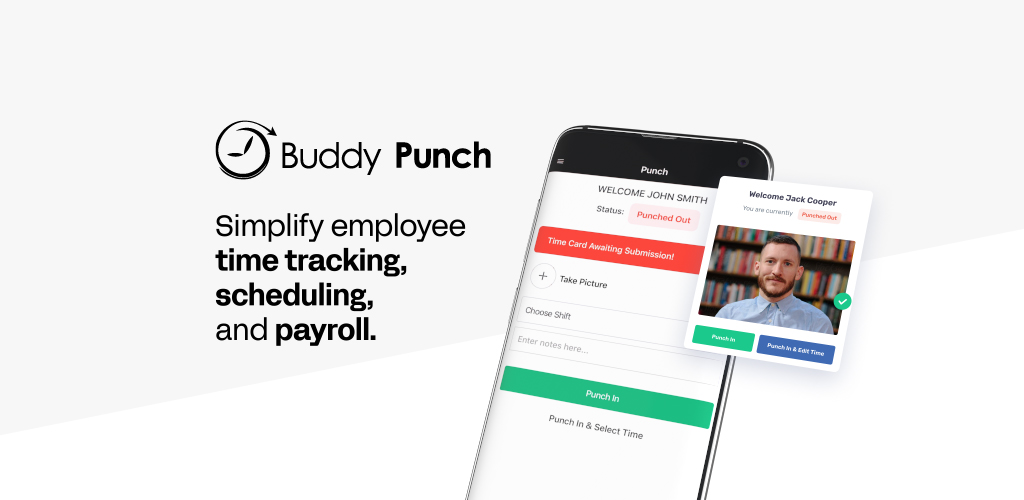
Employees can clock in and out using a browser, mobile app, or desktop. This flexibility ensures that whether they’re in the field, at home, or in the office, their hours are captured with accuracy.
Automatic Hours Calculation
Once hours are logged, Buddy Punch automatically calculates total regular hours, overtime, breaks, and more. This eliminates manual errors that often plague traditional tracking systems.
Flexible Punch Options
Workers don’t even need a unique email to clock in. Buddy Punch offers PIN codes, QR codes, facial recognition, and other options to make entry seamless and reduce “buddy punching” or buddy abuse.
Real-Time Accountability: GPS and Geofencing
For businesses with mobile workforces, real-time location tracking can be a game changer. Buddy Punch offers built-in GPS tracking that logs where employees are when they punch in or out, giving managers confidence that work hours are accurate.
How GPS Tracking Works
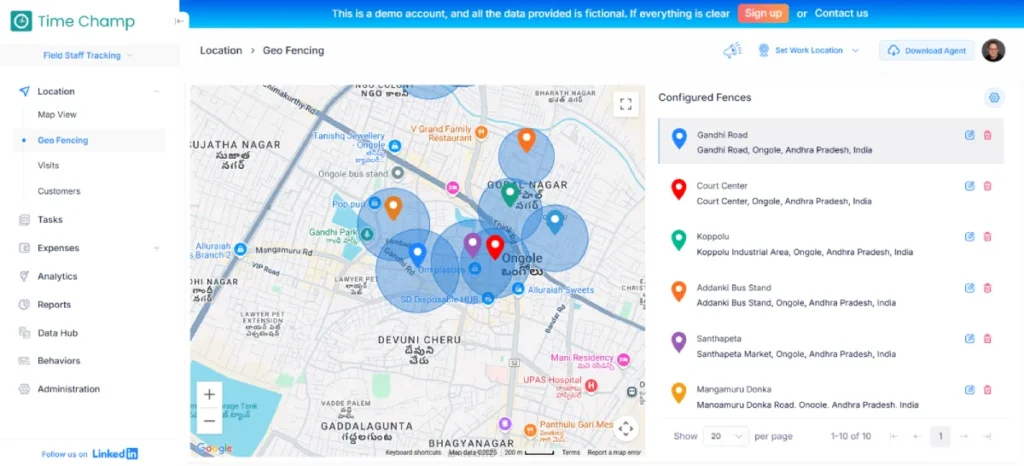
GPS tracking captures an employee’s location based on their mobile device every time they clock in or out. This data can be viewed on an admin dashboard and used to verify that work hours truly correspond to expected job sites.
Geofencing for Field Teams
Buddy Punch also lets businesses define virtual boundaries (geofences) around work sites. Employees can only punch in when they’re within these boundaries, significantly reducing potential time theft and ensuring site-specific accountability.
Scheduling and Attendance Management Simplified
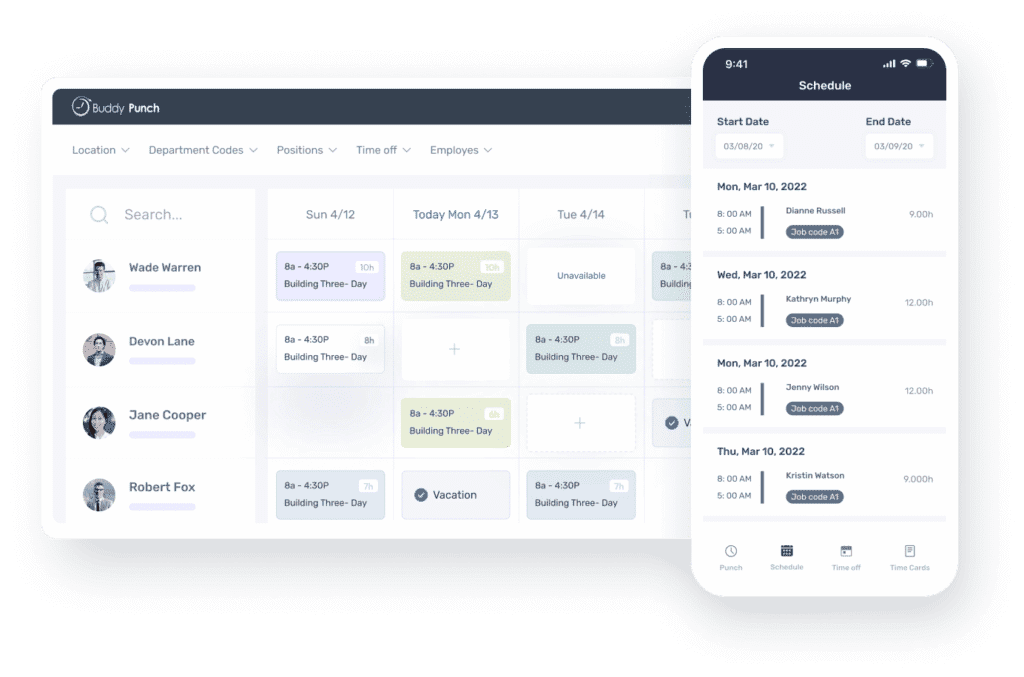
No more juggling separate tools for scheduling and attendance. Buddy Punch brings everything together in a simple interface where managers can build weekly or monthly schedules with a drag-and-drop editor.
Creating schedules becomes fast and organized, and employees get notified automatically of new shifts or changes. Real-time attendance insights help leaders see who clocked in, who’s late, and who’s absent, making daily workforce management smoother.
PTO Tracking and Time Off Requests
Tracking time off manually is a headache. With Buddy Punch, PTO accruals, balances, and requests are automated. Employees can request time off right from the app, and managers can approve or deny with a click.
This makes both sides of the process more transparent, ensuring workers understand their available time off and leadership can plan staffing without guesswork.
Payroll Integration and Automation
One of the biggest benefits of Buddy Punch is how it integrates time tracking with payroll. Rather than exporting messy spreadsheets, you can send clean, accurate data directly to payroll tools like QuickBooks and others with minimal steps.
For teams that want even deeper automation, Buddy Punch offers built-in payroll at a competitive price point, handling everything from direct deposits to tax filings through an integrated solution.
User Experience: Interface and Accessibility
One major reason users love Buddy Punch is how easy it is to use. The interface is clean, intuitive, and does not require heavy training—even for non-tech savvy employees.
Access is available via multiple platforms: desktop, browser, and mobile app (which is included with every plan), so employees and managers can stay connected on the go.
Practical Use Cases Across Industries
Buddy Punch is versatile. It works well for:
- Field-Based Workforces like construction or landscaping, where GPS tracking is essential.
- Office and Remote Teams who need simple clock-in and attendance management with automated reporting.
This versatility makes it especially appealing for small to mid-sized companies that manage diverse worker types.
Benefits for Managers and Business Leaders
Managers gain real-time insight into employee hours, locations, and attendance trends. That data helps with better staffing decisions, labor cost control, and compliance with labor regulations.
Automating these processes also saves time—time that business leaders can spend on growth-oriented tasks rather than chasing down timesheets.
Common Drawbacks and Limitations
No tool is perfect. Some users note occasional glitches in mobile apps or limitations around advanced reporting and integrations unless you upgrade your plan.
There’s also no permanent free tier, although a free trial helps teams explore the platform before committing.
Latest Post




How Buddy Punch Stacks Up Against Competitors
Compared to other time tracking tools, Buddy Punch scores high for ease of use and core functionality, especially for small and medium businesses. Its value rating often exceeds category averages, showing that users feel they’re getting strong capability for the price.
Pricing Overview and Cost-Effectiveness
Buddy Punch pricing typically starts at a competitive base rate per month, with optional add-ons for advanced features. For many small companies, the pricing is affordable when you factor in saved time, reduced payroll errors, and increased accuracy.
Real User Feedback: What Customers Say
Across review platforms, users consistently praise Buddy Punch for its intuitive interface and features that simplify time tracking and payroll. Many note the software is easy to explain to staff and helps reduce manual workload in payroll processing.
Read More:-
Mastering Messaging with SimpleTexting: A Comprehensive Guide
Flamingo Shop: Your Ultimate Pink Shopping Destination
Ordnance Survey: Your Guide to Outdoor Discovery
Red Letter Days: Your Ticket to Unforgettable Experiences
Enhance Your Videos with Movavi (US): A Comprehensive Review
Implementing Buddy Punch in Your Organization
Getting started is straightforward—most teams can be set up within a couple of days thanks to guided onboarding and accessible customer support. Regular training and feedback loops also ensure staff use the system correctly.
Best Practices for Getting the Most Out of Buddy Punch
- Ensure clear policies around clock-in/out procedures.
- Train employees thoroughly to reduce errors.
- Use geofencing for field teams.
- Leverage scheduling and PTO features to their fullest.
These steps help unlock the full potential of Buddy Punch and streamline workforce tracking.
Frequently Asked Questions About Buddy Punch
(FAQs are summarized again in their own FAQ section below)
Looking to the Future: Updates and Innovations
Buddy Punch continues to improve with added functionality and integrations, making it more powerful and flexible over time. Regular updates keep the platform competitive with modern workforce demands.
Summary – Buddy Punch in a Nutshell
In short, Buddy Punch is a well-rounded time tracking and workforce management tool that blends accuracy, simplicity, and automation. It gives businesses full visibility into employee hours and attendance without the headache of manual systems.
Conclusion
Buddy Punch has emerged as a trusted all-in-one solution for time tracking, attendance, scheduling, and payroll automation. With robust features like GPS tracking, flexible punch options, and seamless integrations, it helps businesses eliminate manual timekeeping errors and saves countless hours. Whether you’re managing field teams, remote workers, or office staff, Buddy Punch offers a flexible, user-friendly way to keep your workforce productive and accountable.
Frequently Asked Questions (FAQs)
Q. What platforms does Buddy Punch support?
A.Buddy Punch works on web browsers, desktop, and mobile apps for both Android and iOS, so you can track and manage time anywhere.
Q.Can Buddy Punch track employee location?
A. Yes, it offers GPS tracking and geofencing to verify that employees are at the right worksite when clocking in and out.
Q. Is Buddy Punch suitable for small businesses?
A. Absolutely. Its ease of use, affordability, and automation features make it ideal for small to mid-sized teams.
Q. Does Buddy Punch integrate with payroll systems?
A. Yes, Buddy Punch integrates with popular payroll tools and also offers its own built-in payroll features.
Q. Is there a free version of Buddy Punch?
A. There’s no permanent free plan, but a free trial is available so you can try the system before committing.