Discover the complete guide to Keap CRM and marketing automation for small businesses. Learn about Keap features, pricing, automation tools, integrations, pros and cons, and how it compares to other CRM platforms. Find out how Keap helps entrepreneurs streamline lead management, automate email marketing, improve customer relationships, and grow their business efficiently in 2026.
Table of Contents
- What Is Keap and Why Are Small Businesses Using It?
- Core Features That Make Keap Stand Out
- Keap Automation Tools Explained
- Keap Pricing Plans and Value for Money
- Keap Integrations and Third-Party Apps
- Advantages and Disadvantages of Using Keap
- How Keap Compares to Other CRM Platforms
- Best Industries and Businesses for Keap
- Tips to Successfully Implement Keap in Your Business
- Conclusion
- FAQs
What Is Keap and Why Are Small Businesses Using It?
Keap is a CRM and marketing automation platform built specifically for small businesses. Originally known as Infusionsoft, the company rebranded to Keap to simplify its identity and make the platform more approachable for modern entrepreneurs. The software combines customer relationship management, lead tracking, email campaigns, SMS marketing, invoicing, sales pipelines, scheduling tools, and automation into one ecosystem.
The modern business world moves incredibly fast. Customers expect instant responses, personalized experiences, and seamless communication across multiple channels. If a business fails to follow up quickly, competitors are only one click away. Keap solves this problem by creating automated workflows that handle repetitive communication tasks automatically. Instead of manually emailing every new lead, the system can instantly send a welcome email, assign a follow-up task, schedule reminders, and even segment contacts based on their behavior.
One of Keap’s strongest advantages is its ability to centralize operations. Many businesses use separate tools for email marketing, CRM, payments, forms, calendars, and customer communication. That creates chaos. Data gets lost, workflows break, and teams waste time switching between platforms. Keap acts like a digital command center where everything works together. Recent reviews from TechRadar describe Keap as an “all-in-one growth engine” designed to eliminate fragmented tech stacks for small businesses.
The rise of AI has also made Keap more competitive in 2026. Keap recently introduced AI-driven content generation, smart workflows, and AI-powered automation plays that help businesses create campaigns faster. Think about it like having a virtual assistant inside your CRM. Instead of manually writing repetitive emails or organizing leads, AI tools can suggest responses, generate campaign content, and personalize communication based on customer behavior.
For small businesses operating with limited staff, these features are incredibly valuable. Whether you run a digital agency, coaching business, law firm, medical clinic, or online store, Keap helps automate the invisible work happening behind the scenes.
Core Features That Make Keap Stand Out
Keap is packed with features, but what really matters is how those tools work together. Plenty of CRM systems can store contacts or send emails. Keap’s strength lies in combining automation, communication, payments, and customer management into one streamlined platform. That integration creates smoother workflows and reduces operational friction for business owners.
The contact management system acts as the foundation of the platform. Businesses can store detailed customer information, interaction history, notes, tags, purchase activity, and communication records in a centralized database. This makes personalization much easier because teams always know where leads are in the sales journey. According to Keap’s own CRM feature guides, advanced segmentation and automated lead capture remain among the most important CRM capabilities for growing businesses in 2025 and beyond.
Another standout feature is email marketing automation. Instead of sending mass emails manually, businesses can create automated sequences triggered by customer actions. For example, if someone downloads a free guide from your website, Keap can automatically send a nurture series over the next few days. These behavioral triggers create highly personalized communication while saving enormous amounts of time. Recent Keap reviews also praise the platform’s drag-and-drop email builder and AI-enhanced marketing campaigns.
Keap also includes sales pipeline management, which helps businesses track opportunities visually. Imagine a digital whiteboard where every lead moves through different sales stages like “new inquiry,” “proposal sent,” “negotiation,” and “closed deal.” This visual structure prevents leads from falling through the cracks and gives teams better visibility into revenue opportunities.
One underrated feature is the built-in appointment scheduling and invoicing system. Many businesses pay separately for tools like Calendly, Stripe integrations, or invoicing apps. Keap combines these directly into the platform. Customers can book appointments, receive reminders, pay invoices, and interact with businesses without leaving the ecosystem. Reviews from CRM analysts frequently highlight this unified structure as one of Keap’s biggest strengths for small businesses.
The mobile app also deserves attention. Business owners are no longer tied to office desks. Keap’s mobile tools allow users to manage leads, respond to customers, update tasks, and track pipelines from anywhere. For field sales teams or entrepreneurs constantly traveling, this flexibility becomes essential.
Keap Automation Tools Explained
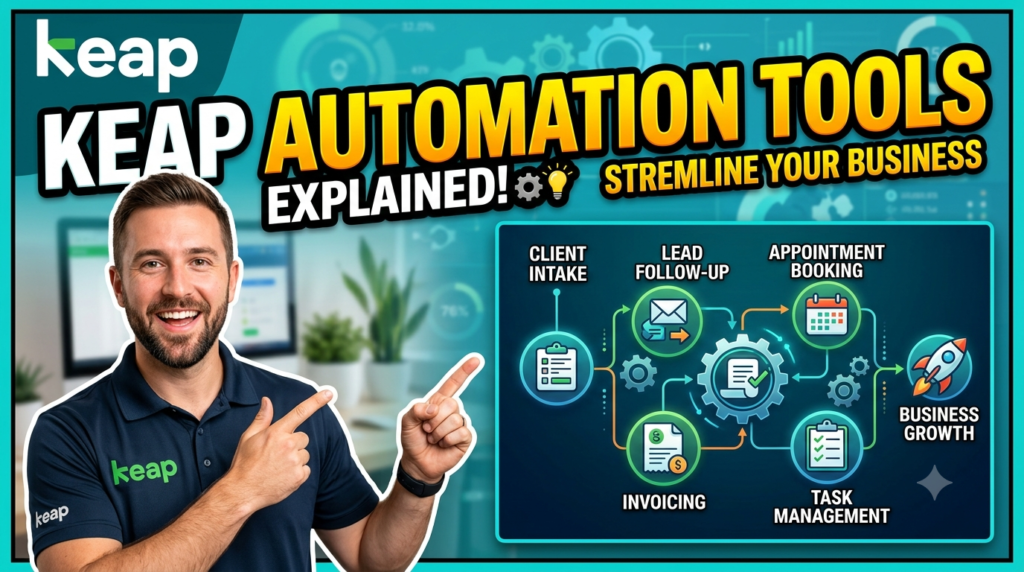
Automation is where Keap truly shines. Plenty of CRM platforms promise automation, but Keap has built its entire identity around simplifying repetitive business tasks. Think of automation like building a domino chain. Once you set the first piece in motion, the rest happens automatically without manual effort.
Keap’s automation builder uses a visual drag-and-drop interface. Users can create workflows based on triggers, actions, and conditions. A trigger could be something like “new lead submitted a form.” The action might be “send welcome email” or “assign task to sales rep.” Conditions allow businesses to customize journeys depending on customer behavior. For example, if a prospect opens an email but does not book a consultation, Keap can send a reminder automatically a few days later.
This matters because speed and consistency are everything in customer communication. Studies consistently show that businesses responding quickly to leads convert at much higher rates. Yet many entrepreneurs lose leads simply because they forget to follow up. Keap eliminates that human bottleneck by automating communication at scale.
Recent AI updates have pushed Keap’s automation capabilities even further. According to TechRadar’s 2026 review, Keap now includes AI Agents capable of lead qualification, SMS engagement, and intelligent scheduling assistance. This implies that companies can automate talks in ways that previously required human employees. AI can analyze customer behavior, recommend next actions, and personalize outreach automatically.
Another powerful capability is tag-based automation. Tags act like labels attached to contacts. If someone clicks on a webinar registration link, downloads a pricing guide, or purchases a service, Keap can automatically apply tags and trigger targeted campaigns. This creates hyper-personalized customer journeys without requiring manual segmentation.
Keap also offers prebuilt templates and automation “plays.” Instead of creating workflows from scratch, businesses can launch ready-made automation campaigns tailored to lead nurturing, appointment booking, onboarding, or customer retention. This significantly lowers the learning curve for beginners.
The beauty of automation is not just efficiency—it is consistency. Humans forget tasks, miss emails, and delay follow-ups. Automation works 24/7 without distractions, helping businesses create more reliable customer experiences.
Keap Pricing Plans and Value for Money
Pricing is often the first thing business owners look at when evaluating CRM software, and Keap positions itself as a premium small business solution. Current pricing generally starts around $249 to $299 per month depending on billing structure and contact limits. While that may sound expensive initially, the real question is whether the platform replaces enough tools and saves enough time to justify the investment.
Here is a simplified breakdown of Keap’s commonly referenced pricing structure:
| Plan | Starting Price | Key Features |
| Keap Pro | Around $299/month | CRM, automation, email marketing, invoicing, appointments |
| Keap Max | Around $289-$299/month | Advanced reporting, lead scoring, AI workflows |
| Max Classic | Custom Pricing | Enterprise customization, affiliate management |
Many small businesses hesitate because cheaper CRM options exist. HubSpot offers a free tier, and some lightweight CRMs cost under $50 monthly. But comparing Keap only on subscription price misses the bigger picture. Keap often replaces several standalone tools at once. Instead of paying separately for email marketing software, appointment scheduling tools, invoicing systems, SMS platforms, and automation apps, businesses consolidate operations into one system.
That consolidation can create substantial savings—not just financially but operationally. Time spent switching between disconnected apps creates inefficiency and human error. Keap reduces those problems by centralizing workflows.
Still, Keap is not perfect. Multiple reviewers point out that the platform has a learning curve and may feel expensive for startups with tight budgets. Businesses with very low-value leads may struggle to justify the pricing compared to simpler CRMs.
The ideal Keap customer is usually a service-based business or company with higher customer lifetime value. If one converted client generates thousands of dollars in revenue, automation can easily pay for itself. A consultant, agency, law office, or coaching business often benefits far more from advanced automation than a company selling low-cost products at high volume.
Keap also includes onboarding resources, customer success managers, and training support with most plans. That guidance can make implementation smoother for businesses unfamiliar with CRM systems.
Keap Integrations and Third-Party Apps
No CRM exists in isolation anymore. Modern businesses rely on dozens of digital tools, and a CRM becomes far more powerful when it connects smoothly with other platforms. Keap understands this reality and offers integrations with many widely used business applications.
Popular integrations include Zapier, Gmail, WordPress, Shopify, Stripe, Google Calendar, Calendly, and BigCommerce. These integrations help businesses automate workflows across different systems without manually transferring data. For example, an ecommerce store using Shopify can automatically push customer purchases into Keap, trigger post-purchase emails, and segment customers based on buying behavior.
Zapier integration is especially important because it expands Keap’s connectivity dramatically. Zapier acts like a bridge between apps, allowing Keap users to connect thousands of external services. This means businesses can automate workflows between Keap and accounting software, webinar platforms, project management tools, and customer support systems.
The API capabilities also matter for businesses needing advanced customization. Developers can build custom integrations, automate proprietary workflows, or connect internal systems to Keap’s database. Larger businesses or growing agencies often rely on these API functions to scale operations efficiently.
One area where Keap performs particularly well is payment and scheduling integration. Many CRM systems require complicated third-party setups for invoicing and appointment booking. Keap’s built-in capabilities simplify the process significantly. Customers can book appointments, receive reminders, pay invoices, and interact with businesses inside a unified workflow.
The real advantage of integrations is creating a seamless customer experience. Imagine a prospect booking a consultation through your website. Instantly, Keap can add them to the CRM, send a confirmation email, schedule reminders, notify your sales team, and start a nurture sequence. That entire process happens automatically because connected systems communicate behind the scenes.
For small businesses trying to scale without hiring large teams, integrations act like invisible employees working around the clock.
Advantages and Disadvantages of Using Keap
Every CRM has strengths and weaknesses, and Keap is no exception. Understanding both sides helps businesses decide whether the platform aligns with their needs and budget.
The biggest advantage of Keap is its all-in-one ecosystem. Instead of managing multiple disconnected tools, businesses get CRM, email marketing, automation, invoicing, scheduling, and communication features in one platform. This creates operational simplicity and reduces software chaos. Reviews consistently praise Keap’s automation capabilities and intuitive workflow builder.
Another major strength is automation depth. Keap goes beyond simple autoresponders by offering advanced workflows, behavioral triggers, AI-assisted campaigns, and lead scoring. Businesses can create highly personalized customer journeys without constant manual effort.
Customer support and onboarding also receive positive feedback. Many plans include dedicated success managers, training resources, webinars, and onboarding assistance. This support can be valuable for businesses implementing CRM software for the first time.
Keap’s mobile functionality is another benefit. Entrepreneurs can manage pipelines, communicate with leads, and monitor automation while traveling or working remotely.
Still, the platform has limitations. Pricing is the most common complaint. Small startups or solopreneurs with minimal revenue may find the monthly costs difficult to justify. Additional onboarding fees and scaling costs for contacts or users can also increase expenses over time.
The learning curve is another challenge. Although Keap aims to simplify automation, advanced workflows still require strategic thinking and setup time. Businesses expecting instant mastery may feel overwhelmed initially.
Customization can also be less flexible compared to enterprise-level CRMs like Salesforce. Some businesses with highly unique processes may outgrow Keap’s capabilities eventually.
The best way to think about Keap is as a powerful operational engine for growth-focused small businesses. It works best when businesses fully commit to automation and customer lifecycle management rather than using it as a simple contact database.
How Keap Compares to Other CRM Platforms
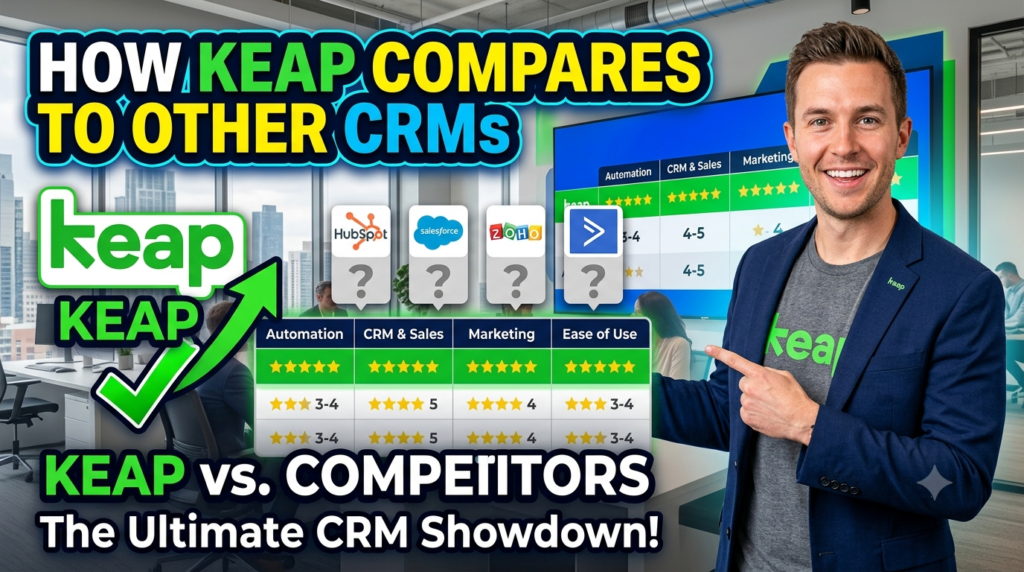
The CRM market is crowded, so comparisons matter. Keap often competes against platforms like HubSpot, GoHighLevel, ActiveCampaign, Zoho CRM, and Salesforce. Each platform has different strengths, pricing models, and ideal users.
Keap vs HubSpot is one of the most common comparisons. HubSpot is extremely popular because of its free CRM tier and polished interface. It works well for businesses needing basic contact management and content marketing tools. However, advanced automation features often require expensive upgrades. Keap tends to offer deeper automation and integrated operational tools like invoicing and appointment scheduling within its ecosystem.
HubSpot also focuses heavily on inbound marketing, while Keap is more centered around automation-driven customer management for small businesses. Businesses wanting sophisticated workflows without assembling multiple add-ons may prefer Keap.
Keap vs GoHighLevel is another interesting comparison. GoHighLevel has gained popularity among agencies because of its white-label capabilities and aggressive pricing structure. Keap, however, is often viewed as more polished and beginner-friendly for traditional small business owners. Recent comparisons also note Keap’s evolving AI ecosystem and automation intelligence.
Here is a simplified comparison table:
| Platform | Best For | Key Strength |
| Keap | Small businesses | Automation + CRM + payments |
| HubSpot | Content marketing teams | Free CRM ecosystem |
| GoHighLevel | Agencies | White-label marketing tools |
| Salesforce | Enterprises | Advanced customization |
| Zoho CRM | Budget-conscious teams | Affordable scalability |
Keap’s competitive edge lies in simplicity combined with automation depth. It is not trying to become an enterprise monster with endless complexity. Instead, it focuses on helping smaller businesses automate growth efficiently.
Read More:-
How Does Strikingly Simplify the Website Building Process?
Building Your Dream Website with Site123
Boost Your E-commerce Strategy with YITH Plugins
Maximize Your Customer Engagement with LiveAgent’s Features
Why STRIPO is Essential for Digital Product Marketers
Best Industries and Businesses for Keap
Not every business needs Keap, but certain industries benefit enormously from its automation-first structure. Service-based businesses are usually the strongest fit because customer relationships and follow-up sequences play a huge role in revenue generation.
Coaches, consultants, marketing agencies, real estate professionals, legal firms, accountants, medical clinics, photographers, and home service providers often rely heavily on appointments, lead nurturing, invoices, and personalized communication. Keap automates those touchpoints beautifully.
Additionally, e-commerce companies might gain by integrating platforms such as WooCommerce or Shopify. Automated abandoned cart emails, post-purchase follow-ups, and customer segmentation help improve retention and repeat purchases.
Businesses with longer sales cycles also gain significant value. If leads require multiple follow-ups before conversion, automation becomes incredibly important. Keap ensures no lead gets ignored simply because a team member forgot to send an email or schedule a callback.
On the other hand, businesses needing extremely advanced enterprise customization may eventually outgrow Keap. Companies managing huge sales teams, complex territories, or large-scale international operations often lean toward Salesforce or Microsoft Dynamics instead.
Keap works best when businesses prioritize relationship management, automation efficiency, and streamlined operations.
Tips to Successfully Implement Keap in Your Business
Buying CRM software is easy. Implementing it successfully is the real challenge. Many businesses fail with CRM systems because they overcomplicate workflows or try automating everything immediately.
The best approach with Keap is starting small. Focus first on automating the most repetitive and time-consuming tasks. Common starting points include lead follow-ups, appointment confirmations, onboarding emails, and invoice reminders.
Clean data is also critical. A CRM filled with duplicate contacts, outdated information, and inconsistent tagging quickly becomes useless. Businesses should organize contact lists carefully before importing them into Keap.
Another smart strategy is mapping your customer journey visually. Think through every stage of the client experience, from first inquiry to final purchase. Once those touchpoints are clear, automation becomes much easier to design effectively.
Training matters too. Even though Keap offers onboarding resources, businesses should dedicate time to learning the platform thoroughly. Automation is powerful, but poorly configured workflows can create customer confusion or communication overload.
One mistake businesses often make is automating communication without personalization. Customers still want human interaction. Automation should enhance relationships, not replace authenticity entirely. The best Keap setups combine automated efficiency with genuine human engagement.
Businesses should also monitor analytics regularly. Open rates, response times, conversion metrics, and pipeline performance provide valuable insights into what is working and what needs adjustment.




Conclusion
Keap has evolved far beyond a simple CRM platform. It now operates as a complete growth engine for small businesses that want to automate operations, improve customer relationships, and scale efficiently without drowning in repetitive work. From CRM management and email automation to AI-powered workflows, invoicing, and scheduling, the platform combines essential business functions into one centralized system.
The biggest strength of Keap is not any single feature. It is the way everything works together. Businesses save time because customer data, communication, payments, appointments, and automation all exist within the same ecosystem. That integration creates smoother workflows and more consistent customer experiences.
Keap is not the cheapest CRM on the market, and it is not designed for massive enterprise corporations. Its sweet spot is growth-focused small businesses that value automation, relationship management, and operational efficiency. If your business depends on lead nurturing, recurring communication, appointments, or personalized customer journeys, Keap can become an incredibly valuable tool.
The modern business landscape rewards speed, consistency, and personalization. Keap helps businesses deliver all three without requiring massive teams or complicated infrastructure. For entrepreneurs trying to reclaim time while scaling smarter, that combination can be transformational.
FAQs
Q. Is Keap good for beginners?
A. Yes, Keap is designed for small businesses and includes onboarding support, training resources, and user-friendly automation builders. Beginners may still face a learning curve, but the platform is easier to manage than many enterprise-level CRMs.
Q. How much does Keap cost in 2026?
A. Current pricing generally starts between $249 and $299 monthly depending on billing structure, contact limits, and selected features.
Q. Does Keap include email marketing automation?
A. Absolutely. Email automation is one of Keap’s strongest features. Businesses can create automated campaigns, nurture sequences, behavioral triggers, and AI-enhanced communication workflows.
Q. What businesses benefit most from Keap?
A. Service-based businesses like agencies, consultants, coaches, real estate firms, legal practices, and medical clinics typically benefit the most because they rely heavily on lead nurturing and customer communication.
Q. Can Keap integrate with other software?
A. Yes. Keap integrates with many popular platforms including Shopify, WordPress, Zapier, Stripe, Gmail, Google Calendar, and Calendly.