Discover how GeneratePress can help improve your WordPress website’s SEO, speed, and overall user experience. This guide explains how GeneratePress supports faster loading times, better Core Web Vitals, mobile-friendly design, clean website structure, optimized images, and lightweight page building. Learn practical ways to use GeneratePress to create a faster, search-friendly WordPress website that delivers a better experience for visitors and supports long-term organic growth.
Table of Contents
- Why WordPress Speed and SEO Matter
- How Website Speed Influences Search Visibility
- What Is GeneratePress?
- How GeneratePress Helps Improve WordPress SEO
- GeneratePress and Core Web Vitals
- Optimize Images for a Faster GeneratePress Website
- Reduce Plugins and Unnecessary Website Bloat
- Improve Your WordPress Site’s Mobile Performance
- Use GenerateBlocks for Lightweight Page Design
- GeneratePress SEO Settings You Should Configure
- GeneratePress, Caching, and CDN Optimization
- Improve Internal Linking and Content Structure
- GeneratePress for Bloggers and Content Websites
- GeneratePress for Business and E-Commerce Websites
- Common GeneratePress SEO and Speed Mistakes
- GeneratePress Free vs Premium
- A Practical GeneratePress SEO and Speed Checklist
- Is GeneratePress Worth Using for SEO?
- Conclusion
- FAQs
Why WordPress Speed and SEO Matter
A WordPress website can have excellent content, attractive branding, and a strong product offering, yet still struggle to attract organic traffic if the website is slow or difficult to use. Search engines need to understand your pages, while visitors expect those pages to appear quickly and work smoothly on phones, tablets, and desktops. That is why WordPress SEO and website performance should be treated as connected goals rather than two completely separate tasks. A technically efficient theme can give you a better starting point, but it cannot magically make every website fast; hosting, plugins, images, scripts, fonts, caching, content structure, and third-party services all influence the final result. GeneratePress is designed around speed, stability, accessibility, and clean output, making it an interesting foundation for WordPress sites where performance matters. The official GeneratePress website currently describes the theme as lightweight and performance-focused and says the theme is used on more than 600,000 websites.
Think of your WordPress theme as the foundation of a house. You can build a beautiful house on a weak foundation, but eventually structural problems become harder to solve. The same idea applies to websites. If the theme produces unnecessary code, excessive styles, or dependencies that you do not need, optimization becomes an uphill battle. GeneratePress attempts to keep the foundation lean so that you can add only the functionality your website actually requires. That approach is particularly useful for bloggers, publishers, agencies, service businesses, affiliate sites, and WooCommerce stores that want design flexibility without automatically loading an enormous collection of features on every page. The important point is that GeneratePress does not replace an SEO strategy. You still need useful content, keyword research, logical information architecture, crawlable pages, internal links, optimized images, strong metadata, and a technically healthy website.
How Website Speed Influences Search Visibility
Website speed matters because people do not browse the web patiently anymore. When someone clicks a search result and sees a blank screen, shifting layout, slow-loading images, or a page that takes several seconds to become usable, they may simply return to the search results and choose another website. Search engines increasingly evaluate user experience through technical performance signals, including the Core Web Vitals framework. Metrics such as Largest Contentful Paint, Interaction to Next Paint, and Cumulative Layout Shift help describe how quickly the main content appears, how responsive a page feels, and how stable the layout remains while loading. A fast theme can therefore contribute to the technical foundation required for a strong user experience, although actual performance depends on the entire WordPress stack.
The biggest mistake is assuming that installing a lightweight theme automatically makes a website fast. Imagine buying a lightweight sports car and then filling its trunk with heavy equipment, attaching unnecessary trailers, and driving on a damaged road. The car itself may be efficient, but the complete system is not. A similar situation happens when a lightweight WordPress theme is combined with dozens of plugins, oversized images, multiple tracking scripts, poorly configured advertisements, unoptimized fonts, and slow hosting. GeneratePress can reduce one source of unnecessary overhead, but you still have to optimize the rest of the website. The official GeneratePress team emphasizes performance as a core focus and describes its code output as professional and clean.
How Website Speed Influences Search Visibility
Speed should therefore be approached as a complete optimization process. Start by selecting reliable hosting, then use a lightweight theme such as GeneratePress, keep plugins under control, compress images, configure caching, reduce unnecessary JavaScript, optimize fonts, and use a CDN when appropriate. After making changes, test the real website instead of assuming that a particular optimization must have worked. Tools such as Google PageSpeed Insights and Lighthouse can reveal opportunities, but a score is not the same thing as a successful website. A site that scores highly but provides confusing navigation and weak content will not automatically outrank a slower competitor with genuinely useful information. Likewise, a website with excellent content can benefit substantially from improving technical performance because visitors can consume that content more comfortably.
The Connection Between User Experience and Rankings
SEO works best when technical optimization and useful content reinforce one another. A visitor who lands on a fast page can immediately scan the headline, understand the purpose of the page, find the navigation, and begin reading. If the content is well structured with descriptive headings, short sections, meaningful internal links, and optimized media, the visitor can continue exploring the site naturally. GeneratePress gives you a flexible foundation for building that experience without forcing you into an overly complicated design system. Its broader ecosystem also includes GenerateBlocks, which is designed to extend the WordPress block editor with reusable design and layout controls. The current GeneratePress site highlights reusable global styles as a way to reduce repeated styling and improve efficiency.
What Is GeneratePress?
GeneratePress is a WordPress theme built around performance, flexibility, accessibility, and maintainability. Instead of trying to become an enormous all-in-one page-building environment, it focuses on providing a lightweight foundation that can be customized according to the needs of the site. The official product page positions GeneratePress as a theme for creators, developers, freelancers, agencies, and businesses, with a strong emphasis on speed and stability. This makes it particularly appealing to people who want control over the structure and appearance of their website without accepting unnecessary technical overhead. You can start from a blank site or use a starter design and then customize the typography, colors, spacing, navigation, layouts, and other elements according to your brand.
GeneratePress has also developed beyond being just a traditional WordPress theme. Its ecosystem includes GP Premium, GenerateBlocks Pro, GenerateCloud, and GeneratePress One, allowing users to combine theme customization with block-based design and reusable patterns. Current pricing lists GP Premium at $59 per year, GenerateBlocks Pro at $99 per year, GenerateCloud at $99 per year, and GeneratePress One at $149 per year, although prices can change. You do not necessarily need every product to create a fast website, which is actually part of the appeal: you can choose the tools that match your project rather than loading every possible feature.
Why GeneratePress Has a Performance-First Approach
GeneratePress has historically placed considerable emphasis on keeping the theme lightweight. An earlier major GeneratePress release described a frontend size of roughly 30 KB for the base theme at that time, alongside changes such as removing jQuery from the theme’s JavaScript and introducing cached dynamic CSS. Those historical figures should not be treated as a promise for the exact size of every modern GeneratePress installation because websites evolve and optional features can add resources. The more useful lesson is the philosophy behind the theme: keep the foundation efficient and allow additional functionality to be enabled when it is actually needed.
How GeneratePress Helps Improve WordPress SEO
A WordPress theme influences SEO indirectly through the technical environment it creates. Search engines do not rank a website simply because it uses GeneratePress, but a clean, responsive, accessible, and performant theme can make it easier to build a technically healthy site. GeneratePress gives you control over layouts and integrates closely with WordPress’s native editing environment, allowing you to create structured content without necessarily relying on a large visual page builder. This can be helpful when building pages where the HTML structure, loading behavior, and visual hierarchy need to remain predictable. The theme itself should be considered a foundation rather than an SEO plugin.
For actual on-page optimization, you still need an SEO solution or appropriate WordPress functionality for titles, descriptions, canonical URLs, XML sitemaps, schema where relevant, redirects, and other search-focused requirements. Your content also needs a clear primary topic and logical subtopics. Use one meaningful H1 for the primary page topic, then organize supporting ideas with H2 and H3 headings. Write descriptive URLs, create useful internal links, optimize images, and make sure important content is accessible to search engines without requiring unnecessary interactions. GeneratePress can support this structure, but the quality of the implementation depends on how you build the site.
Clean Code and Search-Friendly Structure
Clean code is valuable because every unnecessary element has a potential cost. It can increase page size, introduce additional rendering work, create more opportunities for conflicts, or make future maintenance harder. GeneratePress’s performance philosophy is centered on avoiding unnecessary bloat, while its documentation and ecosystem emphasize standards, stability, and performance. This does not mean that every GeneratePress website will automatically have perfect technical SEO. A website can still be poorly optimized even with an efficient theme if the owner installs excessive plugins or adds inefficient customizations.
GeneratePress and Core Web Vitals
Core Web Vitals provide a useful way to think about the experience users receive after clicking your website. Largest Contentful Paint (LCP) looks at how quickly the largest main content element becomes visible, while Interaction to Next Paint (INP) evaluates responsiveness and Cumulative Layout Shift (CLS) measures unexpected movement during loading. A lightweight theme can help reduce the amount of work the browser has to process, but it is only one piece of the puzzle. Large hero images, sliders, third-party scripts, advertisements, web fonts, embedded videos, and poorly optimized plugins can overwhelm even a well-designed theme.
GeneratePress can help because it does not force you to build every page with a heavy visual system. The official site emphasizes performance as one of its central priorities, while GenerateBlocks provides a block-based method for building reusable layouts. If your homepage has a giant background video, five analytics systems, several social feeds, multiple animation libraries, and enormous images, however, changing the theme will not solve the fundamental problem. Think of performance like cooking: the theme is your kitchen equipment, but the ingredients still determine the final meal.
Improving Largest Contentful Paint
To improve LCP on a GeneratePress site, identify the element that normally becomes the largest visible content in the initial viewport. On many websites this is a hero image, large heading, featured image, or text block. Make that resource easy for the browser to retrieve by optimizing the image, avoiding unnecessary redirects, using efficient hosting, and preventing non-critical resources from delaying rendering. If your hero image is 2 MB when it could reasonably be a few hundred kilobytes, the theme cannot compensate for that inefficiency.
The same principle applies to fonts. Loading several font families and numerous weights can create additional network requests and delay rendering. A simple typography system using a limited number of weights can look professional while reducing unnecessary work. GeneratePress has historically emphasized system fonts and efficient frontend output as part of its performance philosophy. For many sites, choosing a simple font stack and limiting custom font variations can be one of the easiest improvements available.
Optimize Images for a Faster GeneratePress Website
Images are among the most common reasons WordPress websites become unnecessarily heavy. A modern camera can produce a photograph that is several megabytes, while a website visitor may only need a much smaller version to see it clearly on a phone. Uploading the original photograph directly into WordPress and placing it prominently on the homepage is like transporting an entire suitcase when you only need one shirt. Before uploading images, resize them to the dimensions actually required by the design and use modern formats such as WebP or AVIF when your workflow supports them. WordPress can also generate responsive image variants so browsers can select more appropriate dimensions for different screens.
Image SEO is not only about file size. Give important images descriptive filenames, use meaningful alternative text when the image conveys information, and avoid stuffing keywords into alt attributes. If an image is decorative and conveys no meaningful information, forcing a keyword-rich description into the alt field can actually make accessibility worse. GeneratePress gives you a lightweight foundation, but your media library remains your responsibility. A fast theme paired with enormous, poorly compressed images is still a slow website.
Use Modern Image Formats and Responsive Images
A good workflow is to compress images before upload when practical, select appropriate dimensions, and review the final page with a performance-testing tool. Lazy loading can prevent below-the-fold images from competing with the initial viewport, while critical above-the-fold images should not be treated exactly the same way as content far down the page. You also want to avoid unnecessary image sliders where a simple static hero section would communicate the same message. Every visual element should earn its place by improving usability, communication, or conversion.
Reduce Plugins and Unnecessary Website Bloat
One of the biggest advantages of using a lightweight theme is lost when the WordPress installation becomes overloaded with plugins. Every plugin is not automatically bad, but every additional plugin can introduce code, database queries, scripts, styles, third-party connections, or compatibility considerations. The smart approach is not to count plugins obsessively; instead, evaluate what each plugin actually contributes and whether its functionality overlaps with something already available. A single well-built plugin that provides several necessary features may be preferable to five small plugins that perform overlapping tasks.
GeneratePress itself follows a modular approach in which additional functionality can be enabled as needed. GeneratePress documentation has previously explained that certain premium modules add resources only when those features are used, illustrating the importance of activating functionality based on actual requirements. Review your plugins periodically, remove inactive plugins rather than leaving them indefinitely, and avoid installing optimization plugins simply because someone recommended them. Too many overlapping caching, minification, image optimization, and security tools can sometimes create conflicts rather than improvements.
Improve Your WordPress Site’s Mobile Performance
Mobile performance should be treated as a primary design requirement rather than an afterthought. A visitor using a mobile connection may have less bandwidth, a less powerful processor, and a smaller screen than someone using a desktop computer on a fast broadband connection. A page that feels acceptable on your office computer may feel frustrating on a phone. GeneratePress supports responsive layouts, allowing you to build designs that adapt across screen sizes, but responsive design still requires thoughtful implementation.
Avoid oversized desktop navigation, unnecessarily large headings, heavy animations, and layouts that depend on excessive horizontal spacing. Test buttons with actual fingers rather than only checking them with a mouse. Make sure text remains readable without zooming and that important actions are easy to find. Mobile SEO is ultimately about making the content and functionality usable regardless of the device. A responsive GeneratePress website gives you the tools, but good design decisions determine the result.
Use GenerateBlocks for Lightweight Page Design
GenerateBlocks extends the WordPress block editor with layout and design capabilities while keeping the overall approach close to native WordPress blocks. This can be useful for people who want more design control without automatically committing to a large page-builder ecosystem. GeneratePress describes GenerateBlocks as a way to build performant and accessible pages, while its current product information highlights reusable patterns and global styles. Reusable styles are particularly useful because they can reduce duplicated styling and make site-wide changes easier.
The goal should not be to replace every WordPress block with a GenerateBlock simply because it exists. Use the simplest component that accomplishes the job. For ordinary paragraphs and headings, WordPress’s core blocks may be all you need. For more sophisticated layouts, reusable sections, cards, buttons, containers, or responsive compositions, GenerateBlocks can provide additional control. The result is a more deliberate design system where every component has a purpose.
GeneratePress SEO Settings You Should Configure
After installing GeneratePress, spend time establishing a clean site structure before worrying about cosmetic details. Configure your site title, tagline, logo, navigation, typography, colors, content width, sidebar behavior, and footer. Then configure your SEO plugin or SEO framework so search engines receive accurate titles and descriptions. Make sure your preferred domain uses HTTPS, redirect variants correctly, and avoid creating multiple versions of the same content. Check your robots.txt and XML sitemap configuration, especially after major changes to your site’s architecture.
Your content hierarchy also matters. Each page should have a clear purpose and primary topic. Use descriptive headings that help both readers and search engines understand the relationship between sections. Add internal links naturally between related articles instead of randomly linking keywords. If you publish blog content, create topic clusters where comprehensive cornerstone pages connect to more specific supporting articles. GeneratePress makes it easier to create clean layouts, but the SEO value ultimately comes from the information architecture and content strategy you implement.
GeneratePress, Caching, and CDN Optimization
Caching can make a dramatic difference because it reduces the amount of work your server needs to perform for repeat visitors. A caching system can store generated pages or resources so that users do not have to trigger the same expensive operations every time. Combine that with browser caching, compressed assets, optimized images, and a content delivery network where appropriate, and the website can become considerably more responsive. However, caching configurations should be tested carefully because aggressive settings can sometimes interfere with dynamic content.
A CDN can help deliver static resources from locations closer to visitors, particularly when your audience is geographically distributed. The correct setup depends on your hosting provider, CDN, caching plugin, and website type. WooCommerce stores, membership websites, dashboards, and other dynamic sites may require more careful cache exclusions than ordinary blogs. GeneratePress provides the lightweight foundation, while your hosting and delivery stack determines much of the real-world performance visitors experience.
Improve Internal Linking and Content Structure
SEO is not simply about loading a page quickly. Search engines need to understand how pages relate to one another, and users need a clear path through your content. Internal linking acts like a road system connecting different neighborhoods of your website. A strong internal linking strategy can help visitors discover related information while giving search engines additional context about the relationships among pages. When you publish a new article, look for older relevant pages that could naturally link to it, and also identify opportunities for the new article to strengthen existing content.
GeneratePress works particularly well for content-focused websites because its layouts can remain simple and readable. You do not need a visually complicated article template to make content engaging. Strong typography, sensible spacing, clear headings, descriptive images, pull quotes when appropriate, and relevant related links can create a much better reading experience. Your website should feel like a well-organized library rather than a crowded marketplace.
GeneratePress for Bloggers and Content Websites
For bloggers, affiliate publishers, news sites, and educational websites, performance can be especially valuable because readers may visit many pages during a session. If every article loads quickly, navigation feels smoother and users can move naturally from one topic to another. GeneratePress provides a flexible foundation for article layouts, archives, sidebars, headers, footers, and other common publishing components. Premium features currently include a theme builder and access to more than 60 starter sites, according to GeneratePress’s pricing page.
The real opportunity is to keep the design consistent. Create a reusable article structure with a clear title, author information where appropriate, featured image, introduction, body sections, related content, and a useful call to action. Avoid turning every article into a completely different design experiment. Consistency helps readers understand your site and makes maintenance easier. When your content library grows from 20 articles to 200 or 2,000, a clean design system becomes far more valuable than endless visual customization.
GeneratePress for Business and E-Commerce Websites
GeneratePress can also work well for service businesses and e-commerce projects where speed, clarity, and conversion are important. A business website does not need dozens of animations to appear professional. Instead, it needs a clear value proposition, fast-loading pages, intuitive navigation, trustworthy information, strong calls to action, and a smooth mobile experience. For an online store, product images and third-party functionality often become more significant performance factors than the theme itself.
If you use WooCommerce, test category pages, product pages, cart functionality, checkout, account pages, and search. Do not optimize only the homepage because customers may enter your website through a product page from Google. Compress product images, avoid unnecessary extensions, and review scripts loaded by payment gateways, analytics tools, chat widgets, and marketing platforms. GeneratePress can provide an efficient foundation, but e-commerce performance requires optimization across the complete customer journey.
Common GeneratePress SEO and Speed Mistakes
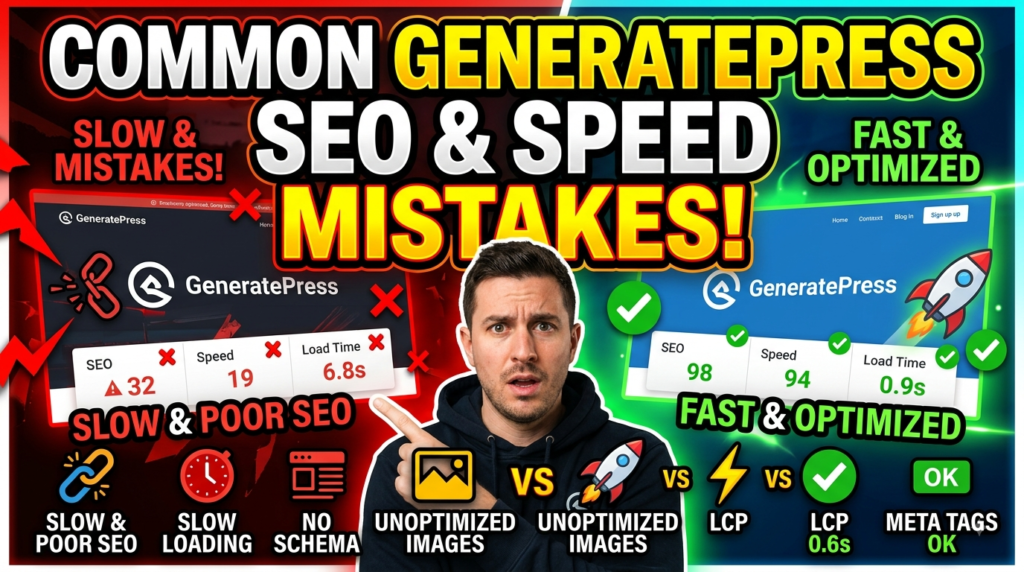
The most common mistake is treating GeneratePress as a magic performance button. Installing it can give you a strong foundation, but a website filled with oversized media, unnecessary plugins, poor hosting, excessive scripts, and inefficient layouts can still perform badly. Another mistake is activating every available feature simply because it exists. More customization does not automatically mean a better website. In fact, unnecessary functionality can make maintenance more difficult and introduce additional resources.
Another common error is chasing performance scores instead of improving the actual user experience. A website owner may spend hours trying to move a score from 95 to 100 while ignoring a confusing navigation menu or weak content. Technical metrics matter, but they should support business and user goals rather than become the goal themselves. Test your pages regularly, fix meaningful problems first, and remember that a website exists for people before it exists for benchmarking tools.
GeneratePress Free vs Premium
The free version of GeneratePress can be an excellent starting point for a simple website. If you need a blog, portfolio, basic business site, or straightforward content website, you may be able to accomplish a lot without purchasing premium features. GP Premium becomes more useful when you need advanced customization, theme-building capabilities, additional design controls, or access to starter sites. Current official pricing lists GP Premium at $59 per year, while GeneratePress One is listed at $149 per year and includes the broader product suite.
| Feature | GeneratePress Free | GP Premium | GeneratePress One |
| Lightweight theme foundation | Yes | Yes | Yes |
| Advanced theme customization | Limited | Yes | Yes |
| Theme Builder | No | Yes | Yes |
| Starter Sites | Limited | 60+ | 80+ |
| GenerateBlocks Pro | No | No | Yes |
| GenerateCloud | No | No | Yes |
| Priority/premium support | Community/free | Premium support | Priority support |
| Best for | Simple sites | Advanced WordPress sites | Complete GeneratePress ecosystem |
The right choice depends on your website rather than the feature count. Buying premium products does not automatically make a website faster. If the free version already provides everything you need, keeping the installation simple may actually be the better performance decision. Choose premium when the additional functionality solves a real problem in your workflow.
Read More:-
Parcel ABC UK Shipping Guide: Features, Pricing, and Benefits Explained
Why Fun-sport-vision.com DE Is Gaining Popularity in Germany
Mashvisor (US): Complete Review for Real Estate Investors in 2026
What Is Scandic SE? A Complete Beginner’s Guide
Simpel NL Explained: Everything You Need to Know
A Practical GeneratePress SEO and Speed Checklist
A good optimization process should be repeatable. Start with a lightweight GeneratePress installation, configure only the modules you actually need, and establish your site’s content structure before adding decorative features. Optimize images, limit font variations, remove unnecessary plugins, configure caching, and test the website on mobile. Then review your SEO fundamentals: page titles, meta descriptions, canonical URLs, headings, internal links, XML sitemap, redirects, structured data where appropriate, and crawlability.
After that, measure your site using both laboratory and real-world data. Check Core Web Vitals, inspect important templates, and look for slow pages rather than assuming that one homepage test represents the entire site. Product pages, blog archives, long-form articles, category pages, and checkout pages can behave very differently. Make changes one at a time when possible so you can identify what actually improved or damaged performance. This approach prevents the classic WordPress optimization problem of installing ten different solutions and then having no idea which one is responsible for the final result.
Is GeneratePress Worth Using for SEO?
For website owners who prioritize performance, maintainability, and design flexibility, GeneratePress is a strong WordPress foundation. Its value comes less from a secret SEO trick and more from its philosophy of keeping the theme focused on speed, stability, accessibility, and clean implementation. The official GeneratePress site currently highlights more than 7 million downloads, over 100,000 happy customers, and use across more than 600,000 websites, while its product ecosystem continues to expand around WordPress blocks and site-building tools.
That said, choosing GeneratePress should be the beginning of your optimization strategy, not the end. You still need high-quality content, good hosting, optimized media, careful plugin selection, proper caching, strong internal linking, mobile usability, technical SEO, and ongoing monitoring. A fast theme cannot rescue a website with no search intent, poor information architecture, or content that fails to answer users’ questions. But when those fundamentals are already in place, starting with an efficient theme can make the entire optimization process easier.




Conclusion
GeneratePress can provide a powerful foundation for improving both WordPress website speed and SEO, particularly when it is used with a disciplined approach to performance and content architecture. Its lightweight philosophy reduces unnecessary complexity, while its customization options allow you to create professional websites without depending on excessive visual effects or bloated functionality. The broader GeneratePress ecosystem also gives advanced users additional tools for block-based layouts, reusable styles, starter sites, and theme customization. Current GeneratePress documentation and product information continue to emphasize performance, accessibility, stability, and efficient site building.
The biggest lesson is simple: a fast theme is a foundation, not a complete SEO strategy. Use GeneratePress to establish a clean technical base, then build on it with optimized images, reliable hosting, caching, sensible plugins, responsive design, useful content, internal linking, and proper technical SEO. Do not chase unnecessary features or performance scores simply for bragging rights. Instead, build a website that loads quickly, communicates clearly, answers searchers’ questions, and gives visitors a reason to stay. When speed, usability, and genuinely helpful content work together, your WordPress website has a much stronger foundation for sustainable organic growth.
FAQs
Q. Is GeneratePress good for WordPress SEO?
A. Yes. GeneratePress can be a strong foundation for SEO because it focuses on performance, accessibility, clean implementation, and flexible layouts. However, the theme itself does not guarantee higher rankings. You still need quality content, keyword targeting, internal linking, technical SEO, optimized media, and a reliable hosting environment.
Q. Does GeneratePress make WordPress faster?
A. GeneratePress is designed with performance in mind and provides a relatively lightweight foundation, but your overall website speed depends on many factors. Hosting, plugins, images, fonts, scripts, caching, CDN configuration, and page design can all affect performance. A lightweight theme is helpful, but it is only one part of the optimization process.
Q. Do I need GeneratePress Premium for SEO?
A. No. You do not need GP Premium simply to implement basic SEO. The free theme can be sufficient for many blogs and simple websites. Premium is more useful when you need advanced customization, the Theme Builder, additional features, or access to starter sites and other premium capabilities.
Q. Can GeneratePress improve Core Web Vitals?
A. GeneratePress can contribute to a better performance foundation because it is designed around speed and efficient output. However, Core Web Vitals measure the experience of the complete page, not just the theme. Large images, third-party scripts, poor hosting, excessive plugins, and inefficient page layouts can still cause poor results.
Q. Is GeneratePress suitable for large WordPress websites?
A. Yes. GeneratePress can be suitable for blogs, publishers, business websites, agencies, and other larger WordPress projects. Its modular approach and emphasis on maintainability can be useful as a website grows. The important factor is maintaining good plugin discipline, content architecture, hosting performance, caching, and ongoing technical optimization.