Appointled is a useful online appointment scheduling solution designed to simplify the way individuals and businesses manage meetings, bookings, and customer appointments. In this Appointled review, discover its key features, benefits, pricing options, calendar integrations, payment capabilities, team scheduling tools, and how the platform works. Whether you are a freelancer, consultant, educator, sales professional, or growing business, Appointled can help reduce scheduling hassles and make appointment management more convenient and organized.
What Is Appointlet?
Appointlet is an online appointment scheduling and meeting-booking platform. Instead of asking customers or prospects to contact you manually to find a suitable time, you can provide a scheduling page where they can see available slots and book according to the rules you establish. The service supports calendar connections, online meeting platforms, customized booking pages, intake forms, meeting types, cancellation and rescheduling, and other scheduling functions. It is designed to work for both individuals and teams, meaning a consultant can use it for one-to-one calls while a company can configure shared availability for multiple team members.
One of the interesting parts of Appointlet is that it does not require every customer to create an account simply to schedule a meeting. The booking experience is intended to be customer-facing and straightforward, which can be useful when the person making the appointment is a prospect who has never interacted with your business before. You can share the scheduling page through a website, email, landing page, or other communication channel. For businesses that depend heavily on consultations, demonstrations, interviews, lessons, appointments, or discovery calls, that turns scheduling from a conversation into a self-service process. The result is a workflow that can run in the background rather than requiring someone to manually coordinate every calendar slot.
How Appointlet Helps Businesses
The main benefit of a scheduling platform is not simply that it puts a calendar on a webpage. The bigger advantage is that it creates a bridge between availability and action. A potential customer may be interested in a consultation, but interest can disappear when booking requires several emails or phone calls. Appointlet allows the person to move directly from “I want to talk” to “Here is the time I selected.” Its website highlights applications across sales, marketing, customer success, education, consulting, retail, and health and wellness, showing that the same scheduling mechanism can support very different business processes.
For a small business owner, this can mean fewer repetitive administrative tasks. For a sales representative, it can make it easier to let prospects book directly. For an educational organization, it can help coordinate tutor or student meetings. For a team, shared availability and round-robin functionality can distribute bookings among available members. Appointlet’s own feature page specifically lists pooled availability, round-robin scheduling, co-hosted meetings, and two-factor authentication among its capabilities.
The Core Scheduling Workflow
The basic workflow is easier to understand if you think of Appointlet as a digital receptionist. First, you define when you are available, what kinds of meetings you offer, how long those meetings should last, and what information you want from the attendee. Next, Appointlet creates a scheduling experience that can be shared with customers or embedded into your online presence. The visitor selects a meeting type, chooses an available time, submits the requested information, and completes the booking process.
After that, the appointment stops being a stand-alone form submission and instead becomes a part of the scheduling procedure. Depending on your setup and subscription, confirmations, reminders, payment collection, video-conferencing links, and integrations can take care of additional steps. Appointlet’s current documentation says users can connect Google Calendar or Office 365, while video conferencing options include Zoom, Google Meet, Microsoft Teams, and others. This makes the platform more than a simple availability calendar; it acts as the coordination layer between the person booking the appointment and the business receiving it.
How Does Appointlet Work?
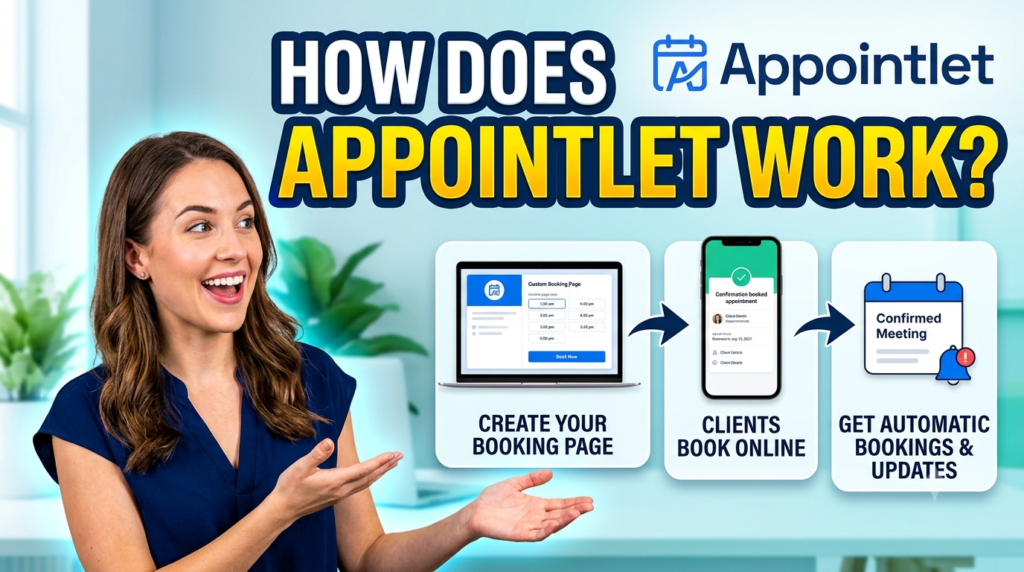
Getting started with Appointlet revolves around creating an account, configuring your availability, setting up meeting types, and connecting the services you want to use. The platform is intentionally centered on scheduling rather than trying to become an all-in-one CRM, accounting system, or project-management application. That focus can be useful because a smaller interface generally means fewer settings to understand before you can start accepting bookings. Current Appointlet information says signup does not require a credit card and that new users can start with the free plan.
Once your basic account is configured, the next step is deciding what people can book. You might create a 30-minute consultation, a 60-minute demonstration, an interview, a tutoring session, or another meeting type. You can establish your available hours and connect your calendar so the scheduling process reflects existing commitments. This matters because the whole purpose of automated scheduling is to prevent the software from creating a second appointment on top of something that is already in your calendar. Appointlet’s integration documentation explains that connected Google or Office 365 calendars can be used to determine availability and help prevent double bookings.
Setting Up Your Booking Page
Your booking page is effectively the storefront of the scheduling system. Instead of sending someone a complicated calendar invitation and asking them to suggest a time, you can give them one place where your meeting options and availability are presented. Appointlet supports customized scheduling pages, meeting types, availability settings, intake forms, and branding controls. Its feature documentation also highlights the ability to create and share scheduling pages and customize the booking experience.
The quality of this page matters because it represents your business at a moment when someone is deciding whether to take the next step. A clean booking process reduces friction, particularly for first-time prospects. You can also use intake forms to collect useful information before the meeting, meaning you are not necessarily entering the conversation completely blind. For example, a consultant might ask what service the visitor needs, while a sales team could collect company size or the subject the prospect wants to discuss. That small amount of information can make the actual appointment more productive.
Connecting Calendars and Meeting Tools
Calendar and conferencing integrations are central to Appointlet’s workflow. The platform supports connections with Google Calendar and Office 365, while its conferencing integrations include services such as Zoom, Google Meet, and Microsoft Teams. According to Appointlet’s integration documentation, users can also connect Stripe or PayPal for payments and use Zapier to pass scheduling information into other CRM, SMS, and marketing workflows.
This integration approach is useful because businesses rarely operate from one application. Your calendar may live in Google or Microsoft, your meetings may happen in Zoom, and your customer information may live somewhere else. Rather than forcing all of those activities into one system, Appointlet can act as the scheduling layer connecting them. That can be especially helpful for small teams that already have a technology stack and simply need a reliable booking component rather than another massive business platform.
Appointlet Features
Appointlet’s feature set focuses heavily on making booking easier while giving businesses control over how appointments are distributed. Its current feature information includes unlimited meeting types, team scheduling, pooled availability, round-robin assignment, co-hosted meetings, intake forms, reminders, payment collection, integrations, and branding controls. Some capabilities depend on the plan, so businesses should check the current pricing and feature matrix before purchasing.
The platform’s design philosophy is relatively focused. Rather than attempting to replace every application a company uses, it concentrates on the point where someone chooses a time and creates a meeting. That makes it particularly relevant to organizations whose workflows revolve around scheduled conversations. A consultant booking discovery calls, a tutor arranging lessons, a sales team coordinating demos, and a business accepting paid consultations all have different goals, but the scheduling mechanism underneath can be similar.
Automated Scheduling and Reminders
Automated scheduling is the foundation of the product. Customers can view available times and select appointments without waiting for someone internally to respond. On the Premium plan, Appointlet provides automated reminders, which can help keep upcoming meetings visible to attendees instead of relying entirely on people to remember them. The current pricing page lists automated reminders as a Premium feature.
Reminders are particularly useful because scheduling and attendance are two different problems. A person can successfully book an appointment and still forget about it several days later. Automated communication creates a simple bridge between those two moments. Appointlet also supports cancellation and rescheduling, allowing the scheduling process to handle common changes without requiring every adjustment to become a manual email conversation. The official platform positions these capabilities as part of its effort to reduce the administrative burden associated with appointments.
Team Scheduling and Round Robin
Team scheduling becomes important when several employees can handle the same type of appointment. Appointlet supports pooled availability and round-robin scheduling, allowing bookings to be distributed across team members instead of forcing every customer to choose a particular employee manually. Its feature page also describes co-hosted meetings, where more than one team member can participate and the system checks their availability before presenting suitable times.
Imagine a sales team with five representatives. Without a shared scheduling mechanism, a prospect might have to choose an individual representative, while managers manually balance workloads behind the scenes. With round robin, the system can distribute meetings according to the configured rules. This can make the booking experience simpler for the customer and reduce some of the coordination work for the business. For organizations where appointments involve multiple people or teams, this is one of the more practical features to evaluate during a trial.
Payments, Forms, and Integrations
Appointlet can also move beyond free appointment booking. On Premium, users can collect payments through supported payment integrations, including Stripe and PayPal, while custom intake forms can gather information before the appointment. Appointlet’s FAQ states that Stripe payment processing is handled through Stripe and that Appointlet does not take a commission on collected payments, although Stripe’s own processing fees apply.
Integrations can expand the workflow further. Appointlet supports Zapier and webhooks on its paid offering, which means scheduling events can trigger actions in connected systems. A booking could therefore become the starting point for another workflow, such as creating a CRM record, triggering a marketing action, or initiating a communication process. The advantage is flexibility, although businesses should remember that third-party automation platforms can introduce their own pricing and configuration requirements.
Appointlet Pricing
Pricing is one of the areas where current information is particularly important because subscription prices can change. Appointlet’s current official pricing page shows a Free plan, a Premium plan listed at $9 per member per month when billed annually, and an Enterprise option with pricing handled separately. The same page currently shows $12 per member per month for monthly billing.
The free plan is designed to provide a meaningful starting point rather than functioning only as a short demonstration. The current pricing information lists up to five members, up to 25 meetings per month, and one scheduling page on the Free plan, along with connections to popular video conferencing services and cancellation or rescheduling capabilities. Premium expands the feature set with automated reminders, payment collection, manual booking confirmation, additional customization, Zapier, webhooks, and removal of Appointlet branding.
Free Plan vs Premium Plan
| Feature | Free | Premium |
| Price | $0 | $9/member/month annually |
| Monthly billing | $0 | $12/member/month |
| Members | Up to 5 | Expanded |
| Meetings | Up to 25/month | Unlimited |
| Scheduling pages | 1 | Expanded |
| Automated reminders | No | Yes |
| Payment collection | No | Yes |
| Zapier | No | Yes |
| Webhooks | No | Yes |
| Branding removal | No | Yes |
| Booking approval | Limited | Yes |
The pricing information above reflects the current official pricing page checked in October 2026.
The difference between the plans is therefore less about getting access to a completely different product and more about removing operational limits and adding business-oriented features. Someone scheduling occasional meetings may find the free plan sufficient, while a business that depends on paid appointments, automated reminders, team workflows, or integrations may need Premium. Additionally, Appointlet claims that its paid plans come with a 30-day money-back guaranty, but its current website advertizes a free starting alternative that doesn’t require a credit card.
Benefits of Using Appointlet

The most obvious benefit is less back-and-forth communication. Instead of spending several messages finding a mutually convenient time, the customer can choose from the availability you publish. That makes the process particularly attractive for people who receive many meeting requests throughout the week. A scheduling page effectively turns availability into a self-service resource, allowing prospects and customers to take action even when the business owner or employee is not actively responding.
Another benefit is the ability to create a more structured appointment process. Intake forms can gather information before a meeting, reminders can reduce the chance of forgotten appointments, and payment integrations can help businesses charge during the booking process. These individual features may look small, but together they can transform scheduling from a manual administrative chore into a repeatable workflow. Appointlet’s own customer examples include organizations using the platform for thousands of bookings and institutions using it to coordinate programs that would otherwise require significant manual effort.
There is also a practical benefit for teams. Round-robin scheduling and pooled availability can help organizations avoid putting the entire burden of appointment distribution on one coordinator. When customers do not care which qualified team member handles their appointment, letting the system manage availability can simplify the customer journey. That does not mean every business should automate every scheduling decision, but for repeatable appointment types, automation can be a useful way to remove unnecessary friction.
Read More:-
How Does Strikingly Simplify the Website Building Process?
Building Your Dream Website with Site123
Boost Your E-commerce Strategy with YITH Plugins
Maximize Your Customer Engagement with LiveAgent’s Features
Why STRIPO is Essential for Digital Product Marketersa
Pros and Limitations
Appointlet’s strengths are closely connected to its focused approach. The free plan provides a genuine starting point, while Premium adds features that become useful when appointment volume or operational complexity increases. Calendar and conferencing integrations make it possible to connect scheduling to tools businesses already use, and features such as round robin, co-hosted meetings, forms, reminders, and payment collection give the platform enough flexibility for many common scheduling scenarios. Current third-party reviews also show positive user feedback, although review volumes vary by platform and should be interpreted accordingly.
At the same time, Appointlet is not intended to replace every business application. Its own recent comparison material acknowledges limitations such as the lack of prepaid appointment packages, memberships, gift certificates, and certain specialized compliance capabilities. Its FAQ also states that recurring meeting types and package sales are not currently supported as built-in functionality. Businesses that need advanced client-management features may therefore need additional software alongside their scheduling system.
| Area | What to consider |
| Scheduling | Strong focus on straightforward online booking |
| Team management | Round robin, pooled availability, and co-hosted meetings |
| Payments | Available through supported integrations on Premium |
| Integrations | Calendar, video conferencing, Zapier, webhooks and more |
| Free access | Available, with usage limits |
| Advanced business management | May require separate software |
| Packages/memberships | Not built in according to current FAQ |
| Recurring meeting types | Not currently supported as a native feature |
The important takeaway is that a scheduling tool should be judged against the actual workflow it needs to support. If the business only needs appointment booking, calendar coordination, reminders, and basic integrations, a focused platform can be enough. If the business requires a full client portal, subscription management, complex package sales, extensive healthcare compliance, or sophisticated CRM functionality, additional requirements should be evaluated before adopting the software.
Who Should Use Appointlet?
Appointlet can be relevant to consultants, sales teams, tutors, coaches, service providers, educators, recruiters, customer-success teams, and other professionals who regularly schedule meetings. Its flexibility comes from the fact that the underlying booking process can be adapted to different appointment types. The platform’s own use-case pages cover areas including sales and marketing, education, retail, property management, and health and wellness.
It can also make sense for a small business that wants to test online scheduling without immediately committing to a paid subscription. The Free plan provides a way to understand the workflow before paying, while Premium can be introduced when the business needs unlimited meetings, automated reminders, payments, branding controls, or automation integrations. Current Appointlet materials state that new accounts can start without a credit card, making the initial evaluation relatively low-friction.
Larger organizations should evaluate the Enterprise offering and their specific requirements separately. Enterprise support includes priority support and additional security-related services according to Appointlet’s current pricing materials, but pricing is handled through a sales conversation rather than a simple public monthly figure. As with any business software, larger organizations should also consider factors such as user administration, security requirements, integration architecture, data policies, and support expectations before deployment.



Conclusion
Appointlet is a focused online scheduling platform built around a simple idea: make it easier for people to find available times and book meetings without endless back-and-forth communication. Its current feature set includes booking pages, calendar connections, video-conferencing integrations, intake forms, team scheduling, round robin, reminders, payment collection, and automation options. The Free plan gives smaller users a way to start without paying, while Premium currently costs $9 per member per month with annual billing or $12 monthly and adds more advanced scheduling and business features.
For anyone researching an Appointled review, it is important to distinguish the spelling from the actual product name found in current search results: the scheduling platform covered here is Appointlet. Its biggest strength is its focused approach to scheduling rather than trying to become an entire business-management ecosystem. Whether it fits a particular business depends on the required workflow, appointment volume, integrations, payment needs, and whether features such as packages, memberships, or specialized compliance are necessary. Checking the current plan details and testing the free option can help a business understand whether its scheduling workflow fits the platform before committing to a paid subscription.
FAQs
Q. What is Appointlet used for?
A. Appointlet is used for online appointment and meeting scheduling. Businesses and individuals can create booking pages, publish their availability, allow customers to select appointment times, connect calendars, and integrate meeting platforms such as Zoom, Google Meet, and Microsoft Teams.
Q. Is Appointlet free?
A. Yes. Appointlet currently offers a Free plan. Its official pricing page lists limits including up to five members, 25 meetings per month, and one scheduling page, while Premium adds features such as automated reminders, payment collection, Zapier, webhooks, and branding removal.
Q. How much does Appointlet cost?
A. The current Premium price is $9 per member per month when billed annually or $12 per member per month when billed monthly. Appointlet also provides an Enterprise option with custom pricing.
Q. Can Appointlet accept payments?
A. Yes. Premium users can connect payment services including Stripe or PayPal and require payment as part of the booking process. Appointlet states that it does not currently take a commission on payments collected, although payment processors such as Stripe charge their own processing fees.
Q. Does Appointlet work with Google Calendar and Zoom?
A. Yes. Appointlet supports Google Calendar and Office 365 calendar connections, while its conferencing integrations include Zoom, Google Meet, Microsoft Teams, and other supported services. These integrations allow scheduling and meeting coordination to work together instead of requiring users to manage each step manually.