Learn how Woodpecker helps businesses automate cold email outreach, improve email deliverability, personalize campaigns at scale, and generate more leads efficiently. This complete guide covers Woodpecker’s key features, including email warm-up, inbox rotation, LinkedIn automation, campaign tracking, pricing, and best practices for successful outbound sales. Whether you’re a marketer, startup founder, recruiter, or sales professional, this article will help you build smarter cold email campaigns that increase replies and drive better results.
What Is Woodpecker?

Imagine trying to manually send 500 personalized emails every week while tracking replies, scheduling follow-ups, warming up inboxes, and making sure your domain reputation stays healthy. Sounds exhausting, right? That’s the problem Woodpecker was built to solve. Woodpecker is a cold email outreach automation platform designed primarily for B2B sales, lead generation, recruitment, partnerships, and outbound marketing campaigns. The platform automates repetitive outreach tasks while helping users maintain high deliverability rates and personalized communication.
Unlike traditional email marketing tools such as Mailchimp or Constant Contact, Woodpecker focuses specifically on cold outreach. That means it’s optimized for reaching people who have never interacted with your brand before. The platform connects directly to email providers like Google Workspace and Microsoft 365, allowing users to send campaigns from real inboxes instead of bulk marketing servers. This approach helps emails appear more human and less promotional.
One of Woodpecker’s biggest selling points is its focus on deliverability infrastructure. The platform includes built-in warm-up features, bounce detection, adaptive sending, inbox rotation, and domain monitoring tools. In simple words, Woodpecker doesn’t just help you send emails—it helps your emails actually reach inboxes instead of getting buried in spam folders. According to the platform’s official feature pages, deliverability tools like Bounce Shield, Adaptive Sending, and Deliverability Monitor are central parts of its system.
The Evolution of Cold Email Automation
Cold emailing used to be simple. Sales reps could send hundreds of generic messages from a Gmail account and still get decent response rates. That era is gone. Today, inbox providers like Gmail and Outlook use sophisticated spam detection systems powered by machine learning. They analyze sender behavior, domain reputation, engagement signals, authentication protocols, and sending patterns. One careless campaign can destroy a domain’s reputation overnight.
This shift forced cold outreach tools to evolve rapidly. These days, sender health, technological configuration, and behavioral automation are given top priority on modern platforms. Woodpecker adapted to this new reality by adding warm-up automation, inbox rotation, SPF/DKIM/DMARC configuration support, and AI-driven sending optimization.
The result is a platform that behaves more like a sales infrastructure system than a simple autoresponder. Instead of blasting messages, Woodpecker simulates natural human sending behavior. Emails are staggered, follow-ups are conditional, and campaigns respond dynamically based on prospect actions. This evolution reflects a broader trend in outbound sales: quality and reputation now matter more than raw volume.
Why Businesses Use Woodpecker
Businesses adopt Woodpecker because outbound sales remains one of the fastest ways to generate leads when executed correctly. According to Woodpecker’s own outreach materials, companies use the platform for lead generation, recruitment, partnership outreach, agency prospecting, SaaS growth, and B2B appointment setting.
Startups love Woodpecker because it provides enterprise-grade automation without requiring a large sales team. Agencies appreciate features like centralized inboxes, client dashboards, and unlimited team collaboration. Recruiters use it to contact passive candidates at scale. Sales teams benefit from automated follow-ups that keep conversations moving without manual effort.
There’s also a psychological factor involved. Humans are terrible at consistency when repetitive tasks pile up. Following up manually with hundreds of prospects is like trying to water an entire forest using a coffee mug. Automation ensures no lead slips through the cracks while still maintaining personalization and timing.
Core Features of Woodpecker
The reason Woodpecker has remained competitive in the crowded outreach software market is its feature ecosystem. Instead of focusing on one isolated function, the platform combines outreach automation, deliverability protection, and multi-channel prospecting into one workflow.
Automated Cold Email Sequences
At the heart of Woodpecker lies its automated sequence engine. Users can create multi-step cold email campaigns with personalized messaging, conditional follow-ups, and behavior-based triggers. For example, if a prospect opens an email but doesn’t reply, Woodpecker can automatically send a reminder after several days. If the prospect replies, the sequence stops instantly to avoid awkward automated follow-ups.
The platform supports advanced personalization variables, enabling users to customize names, company references, job titles, industries, and even conditional snippets within messages. This matters because modern prospects can detect copy-pasted outreach immediately. Personalization isn’t just a “nice-to-have” anymore—it’s survival.
Another impressive capability is A/B testing. Woodpecker allows marketers to experiment with subject lines, messaging styles, and calls-to-action. Think of it like tuning a race car. Tiny adjustments in wording can significantly impact reply rates, open rates, and conversions.
Email Warm-Up and Deliverability
Deliverability is arguably Woodpecker’s strongest advantage. Many cold outreach campaigns fail before the recipient even sees the email. That’s why Woodpecker heavily emphasizes sender reputation management.
The platform includes automated email warm-up, which gradually increases sending volume while generating natural engagement activity between inboxes. This process builds trust with email providers. It’s similar to slowly introducing yourself to a neighborhood instead of suddenly shouting through a megaphone on day one.
Woodpecker also provides:
- Bounce detection
- Spam risk monitoring
- Deliverability scoring
- Domain audits
- Adaptive sending controls
- Catch-all verification
These systems reduce the chances of blacklisting and improve inbox placement. According to outreach experts cited in Woodpecker’s deliverability checklists, safe sending often means limiting inboxes to fewer than 30 cold emails daily during early stages.
Inbox Rotation and Adaptive Sending
Scaling cold outreach safely requires more than one inbox. Sending thousands of emails from a single account is like trying to drive a truck across a fragile wooden bridge—it eventually collapses under pressure.
Woodpecker solves this problem with inbox rotation. By dispersing emails throughout several linked inboxes, the technology lowers account load while preserving campaign volume.
Adaptive Sending adds another layer of protection by adjusting sending patterns dynamically based on provider limits and engagement signals. Instead of pushing aggressive sending schedules, the platform throttles activity intelligently. This helps users avoid spam triggers and maintain long-term sender health.
LinkedIn Outreach Automation
Modern outbound sales rarely relies on email alone. Buyers interact across multiple channels, and Woodpecker acknowledges this reality by integrating LinkedIn activities into outreach campaigns.
Users can automate:
- LinkedIn profile visits
- Connection requests
- Direct messages
- InMail sequences
This multi-channel strategy dramatically increases touchpoints with prospects. Think of it as building familiarity gradually rather than hoping one cold email magically closes a deal.
How Woodpecker Works
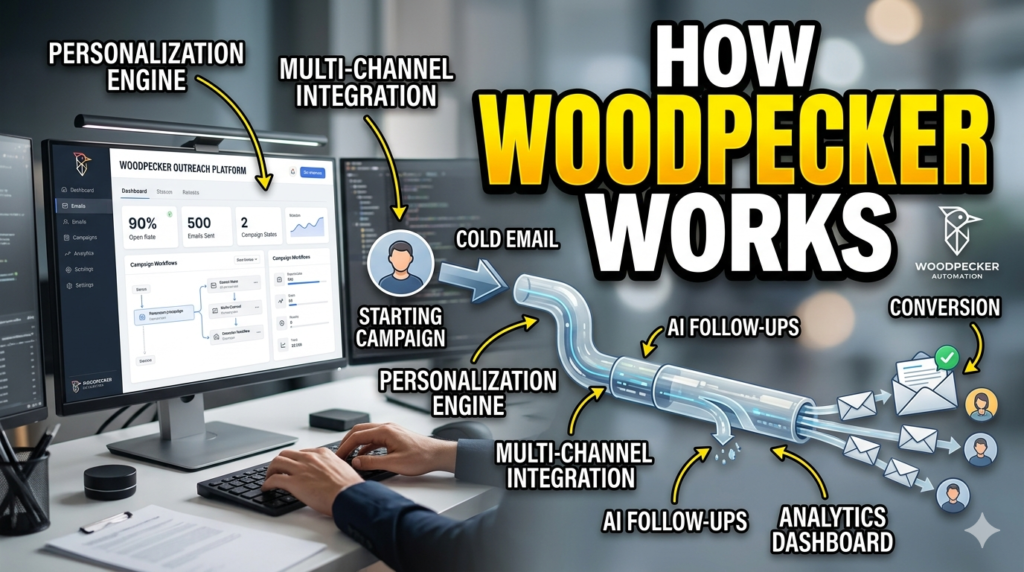
Learning Woodpecker feels less intimidating than many enterprise sales platforms. The interface is relatively clean, and most workflows follow a logical campaign-building structure.
Setting Up Your First Campaign
The first step involves connecting email accounts through Google Workspace, Outlook, or SMTP providers. Woodpecker then guides users through authentication checks, domain setup, and warm-up activation.
Next comes prospect uploading. Users can import CSV files, integrate CRMs, or access B2B lead databases directly from connected systems. Segmentation is crucial here. Sending the same message to CEOs, marketers, recruiters, and developers rarely works well.
Campaign creation involves:
- Writing email sequences
- Setting delays between follow-ups
- Configuring personalization variables
- Defining sending schedules
- Activating deliverability protections
The automation engine handles the rest.
Managing Prospects and Segmentation
Good outreach feels personal because it’s targeted. Woodpecker allows users to organize prospects into highly segmented lists based on industry, role, geography, company size, or engagement history.
This capability matters enormously for conversion rates. A SaaS founder responds differently from a manufacturing executive. Segmentation enables messaging that actually resonates with the recipient’s world.
Woodpecker also supports condition-based campaigns. If a prospect clicks a link, replies positively, or ignores emails entirely, workflows can adapt automatically.
Tracking Campaign Analytics
Data drives optimization. Woodpecker’s analytics dashboard tracks:
- Open rates
- Reply rates
- Bounce rates
- Click-through rates
- Deliverability health
- Campaign performance trends
This information reveals what’s working and what needs improvement. If open rates are strong but replies are weak, the problem likely lies in messaging rather than subject lines. If bounce rates spike, list quality may be poor.
Outbound success often comes from continuous refinement rather than one perfect campaign.
Benefits of Using Woodpecker
Woodpecker’s popularity stems from its ability to simplify complex outreach workflows while improving campaign reliability.
Improved Deliverability
Deliverability separates successful outbound campaigns from wasted effort. Woodpecker’s infrastructure-first philosophy helps businesses avoid catastrophic sender reputation damage. Features like warm-up automation, adaptive sending, verification, and domain audits create a safer environment for scaling outreach.
Without these safeguards, even excellent copywriting becomes meaningless because prospects never see the messages.
Time-Saving Automation
Manual follow-ups drain productivity. Research consistently shows follow-ups dramatically increase reply rates, yet most sales reps fail to send them consistently. Woodpecker automates this process entirely. According to Woodpecker feature materials, even a single follow-up can increase reply rates by approximately 22%.
Automation allows teams to focus on conversations and closing deals instead of administrative repetition.
Better Personalization at Scale
Scaling personalization manually is almost impossible. Woodpecker bridges this gap through dynamic fields, conditional messaging, and segmented workflows.
The platform lets businesses sound human even while running large-scale outreach campaigns. That balance between automation and authenticity is what modern outbound sales requires.
Woodpecker Pricing and Plans
Pricing changes frequently in SaaS platforms, but recent reviews indicate Woodpecker offers multiple plans tailored to different business sizes and outreach volumes.
| Plan | Starting Price | Best For | Key Features |
| Starter | Around $24–$29/month | Freelancers & startups | Basic outreach, warm-up, verification |
| Growth/Plus | Around $89/month | Small sales teams | Inbox rotation, AI tools, integrations |
| Scale/Pro | Around $188–$199/month | Agencies & larger teams | Unlimited users, advanced automation |
| Enterprise/Max | Custom pricing | High-volume organizations | Large-scale outreach infrastructure |
Starter and Growth Plans
Small enterprises and lone users are the target audience for the lower-tier programs. These plans typically include limited prospect quotas, basic deliverability tools, and a small number of warm-up inboxes.
For startups testing outbound sales for the first time, these entry-level options provide enough infrastructure without massive investment.
Scale and Agency Solutions
Larger plans support agencies managing multiple clients and teams running extensive campaigns. Features like unlimited users, advanced collaboration, inbox rotation, centralized reporting, and API access become increasingly important at scale.
Centralized management systems and client dashboards are very useful for agencies.
Woodpecker vs Competitors
Cold outreach software has become an intensely competitive market.
Woodpecker vs Lemlist
Lemlist emphasizes visual personalization and AI-generated imagery. Woodpecker focuses more heavily on deliverability and infrastructure reliability.
If inbox placement matters most, Woodpecker often has the edge. If creative personalization is your priority, Lemlist may feel more exciting.
Woodpecker vs Instantly
Instantly is known for aggressive scaling and large warm-up networks. Woodpecker offers a cleaner, more stable experience focused on operational simplicity.
Some users prefer Instantly’s speed; others appreciate Woodpecker’s mature reliability.
Woodpecker vs Smartlead
Smartlead targets agencies aggressively with white-labeling and high-volume scaling features. Woodpecker competes by simplifying workflows and emphasizing long-term deliverability health.
Choosing between them often depends on whether you prioritize raw scaling or infrastructure stability.
Read More:-
How Does Strikingly Simplify the Website Building Process?
Building Your Dream Website with Site123
Boost Your E-commerce Strategy with YITH Plugins
Maximize Your Customer Engagement with LiveAgent’s Features
Why STRIPO is Essential for Digital Product Marketers
Best Practices for Cold Email Outreach
Even the best software cannot save poor strategy.
Writing High-Converting Cold Emails
Strong cold emails are concise, relevant, and conversational. Long corporate paragraphs usually fail because busy professionals skim quickly.
Effective outreach typically includes:
- Personalized opening
- Clear value proposition
- Simple call-to-action
- Natural tone
- Short length
Think of cold emails like movie trailers. Their goal isn’t to explain everything—it’s to create curiosity.
Avoiding Spam Filters
Deliverability best practices include:
- Warming inboxes gradually
- Authenticating domains with SPF/DKIM/DMARC
- Verifying email lists
- Avoiding spam trigger words
- Maintaining low complaint rates
Woodpecker automates much of this process, but strategy still matters.
Scaling Outreach Safely
Scaling too quickly and aggressively causes many firms to fail. Safe scaling involves gradually increasing sending volume while monitoring engagement and bounce rates closely.
Woodpecker’s Adaptive Sending and inbox rotation tools help reduce risk during expansion.
Who Should Use Woodpecker?
Woodpecker works best for:
- B2B SaaS companies
- Lead generation agencies
- Recruiters
- Sales development teams
- Consultants
- Startup founders
- Business development professionals
Companies relying heavily on outbound prospecting will likely benefit most from the platform.
Businesses seeking simple newsletter marketing, however, may prefer traditional email marketing software instead.
Common Mistakes to Avoid
Many users sabotage outreach campaigns unintentionally.
Common mistakes include:
- Sending too many emails too quickly
- Using poor-quality prospect lists
- Writing generic copy
- Ignoring follow-ups
- Neglecting deliverability setup
- Over-automating conversations
Automation should amplify human communication—not replace it entirely.



Conclusion
Cold email outreach remains one of the most powerful growth channels in B2B business when executed correctly. But modern outreach is no longer about blasting massive lists with generic messaging. Success now depends on deliverability, personalization, timing, segmentation, and intelligent automation.
Woodpecker has evolved into a comprehensive outbound sales platform that addresses these challenges directly. Its focus on inbox placement, warm-up automation, adaptive sending, inbox rotation, and multi-channel outreach makes it particularly attractive for businesses serious about scalable outbound campaigns.
The platform isn’t magic. Great results still require thoughtful strategy, compelling copy, accurate targeting, and continuous optimization. But Woodpecker provides the infrastructure needed to execute modern cold outreach safely and efficiently. In a world where inbox competition grows fiercer every year, that infrastructure can become the difference between ignored spam and meaningful business conversations.
FAQs
Q. Is Woodpecker suitable for beginners?
A. Yes. Woodpecker offers a relatively user-friendly interface compared to many enterprise outreach platforms. Beginners can launch campaigns quickly while still accessing advanced deliverability tools.
Q. Does Woodpecker support LinkedIn automation?
A. Yes. The platform integrates LinkedIn outreach actions such as profile visits, connection requests, and direct messaging into campaigns.
Q. How does Woodpecker improve email deliverability?
A. Woodpecker improves deliverability through warm-up automation, inbox rotation, adaptive sending, bounce monitoring, and domain health tools.
Q. Can agencies manage multiple clients inside Woodpecker?
A. Yes. Agency-focused features include client dashboards, team collaboration tools, and centralized management systems for handling multiple outreach campaigns.
Q. Is cold emailing still effective in 2026?
A. Absolutely. Cold emailing still generates leads and meetings when campaigns focus on personalization, relevance, and deliverability best practices.