Discover how QuillBot simplifies content rewriting with its powerful paraphrasing modes, grammar checks, and AI-driven tools. This blog post explores QuillBot’s key features, major benefits, and real-world use cases, helping students, writers, and marketers create clear, original, and high-quality content faster and more efficiently.
Table of Contents
- Introduction to QuillBot
- What Is QuillBot?
- Why Paraphrasing Matters in the Digital Age
- How QuillBot Works
- AI and Natural Language Processing Explained
- User-Friendly Interface Overview
- Core Features of QuillBot
- QuillBot Paraphrasing Modes Explained in Detail
- Benefits of Using QuillBot
- Use Cases of QuillBot
- QuillBot for SEO Content Writing
- Free vs Premium QuillBot
- QuillBot Integrations and Compatibility
- Pros and Cons of QuillBot
- Tips to Get the Best Results from QuillBot
- Is QuillBot Safe and Reliable?
- Future of AI Paraphrasing Tools
- Conclusion
- FAQs
Introduction to QuillBot
Let’s be honest—writing is hard. Whether you’re staring at a blank page or rewriting the same paragraph for the tenth time, words don’t always flow the way we want them to. That’s exactly where QuillBot steps in like a helpful co-writer who never gets tired.
What Is QuillBot?
QuillBot is an AI-powered paraphrasing and writing assistance tool designed to rewrite, refine, and improve text without changing its original meaning. Think of it as a smart editor that helps you say the same thing—just better, clearer, and more naturally.
Why Paraphrasing Matters in the Digital Age
In today’s content-driven world, originality is everything. Search engines hate duplicate content, professors dislike copied assignments, and readers expect fresh perspectives. Paraphrasing helps you stay original while keeping your ideas intact—like changing the outfit without changing the person.
How QuillBot Works
AI and Natural Language Processing Explained
At its core, QuillBot uses advanced AI and Natural Language Processing (NLP). Instead of simply swapping words with synonyms, it understands sentence structure, context, and tone. That’s why its output feels human rather than robotic.
User-Friendly Interface Overview
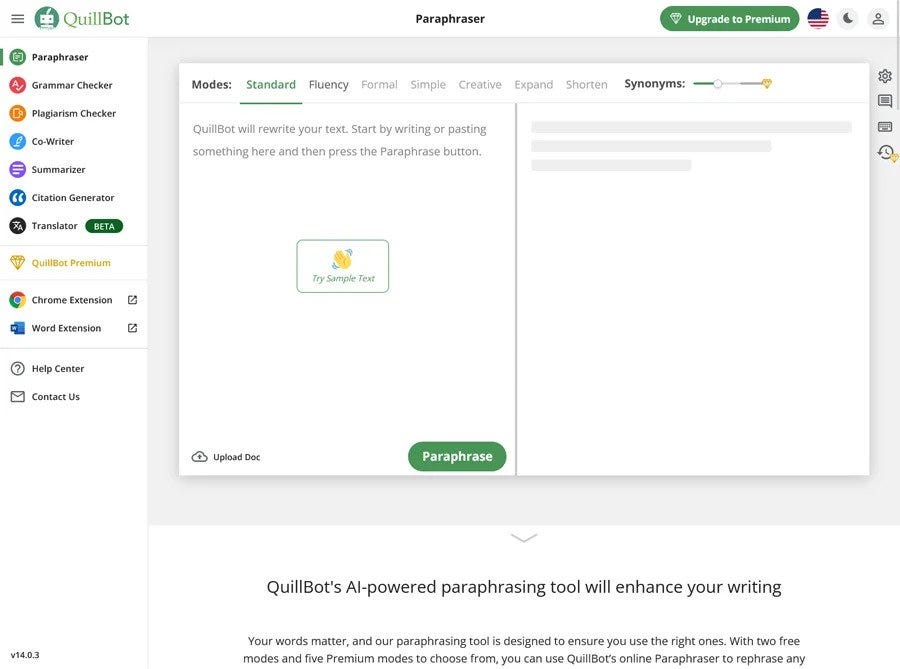
No complicated dashboards here. You paste your text, choose a mode, adjust the synonym slider, and boom—your rewritten content appears instantly. Simple, fast, and intuitive.
Core Features of QuillBot
Paraphrasing Modes
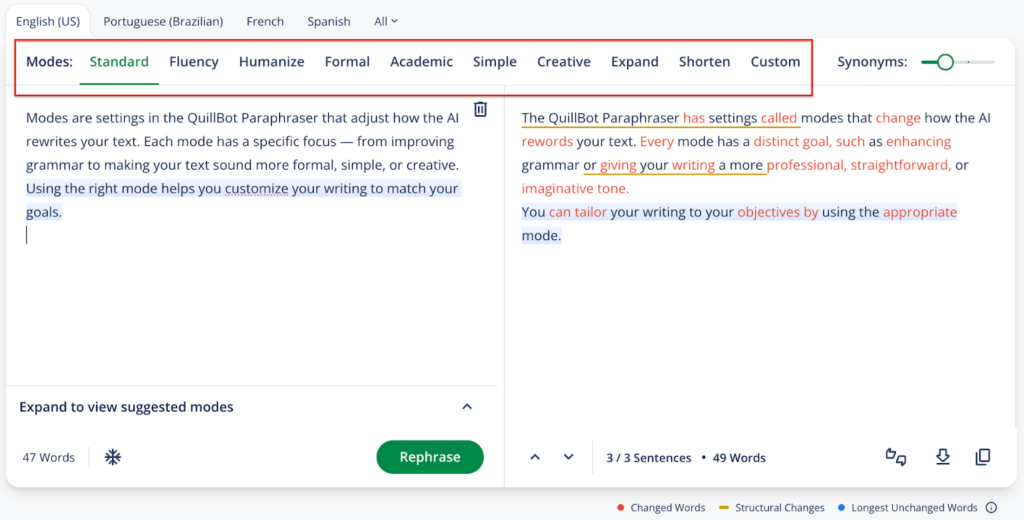
QuillBot shines because of its multiple paraphrasing modes, each designed for a specific writing goal.
Standard Mode
Perfect for everyday rewriting. It balances clarity and originality without sounding forced.
Fluency Mode
Best when grammar and readability are your top priorities. Ideal for polishing rough drafts.
Formal Mode
Need a professional tone? This mode is great for emails, reports, and academic writing.
Simple Mode
Breaks down complex sentences into easy-to-understand language—excellent for beginners and ESL users.
Creative Mode
Adds variety and flair, making content more engaging. Bloggers love this one.
Expand & Shorten
Want to hit a word count or make text concise? These modes do exactly that.
Latest Post




Synonym Slider Control
This is where QuillBot gets fun. Slide it left for safer rewrites or right for more aggressive paraphrasing. You’re always in control.
Grammar Checker
QuillBot’s grammar checker catches errors in punctuation, tense, and sentence structure—like a second pair of eyes that never blinks.
Plagiarism Checker
Ensure your content is original by scanning it against billions of online sources. A must-have for students and professionals.
Summarizer Tool
Long articles? Research papers? QuillBot’s summarizer condenses them into key points without losing meaning.
Citation Generator
Automatically generate citations in APA, MLA, or Chicago formats. Academic writing just got easier.
QuillBot Paraphrasing Modes Explained in Detail
When to Use Each Mode
- Writing a blog? → Creative
- Submitting an assignment? → Formal or Fluency
- Explaining complex ideas? → Simple
Real-World Examples
A boring sentence can turn engaging, formal text can sound friendlier, and long paragraphs can become crisp—all with a few clicks.
Read More:-
Why Toptal Is the Best Platform to Hire Elite Developers and Designers
Xero Accounting Software: A Complete Guide for Growing Businesses
How ZoomInfo Helps Marketing Agencies Find High-Quality Leads
How Geekbuying Supports Smart Tech Purchases for Agencies
Why Customon Is Gaining Popularity Among Online Brands
Benefits of Using QuillBot
Time-Saving for Writers
Why spend hours rewriting when QuillBot does it in seconds?
Improved Writing Quality
Your ideas stay the same, but the delivery becomes smoother and more impactful.
SEO-Friendly Content Creation
Fresh wording helps avoid duplicate content penalties and improves rankings.
Academic Integrity Support
Paraphrasing helps students avoid unintentional plagiarism while learning proper writing skills.
Use Cases of QuillBot
Students and Academics
Perfect for essays, research papers, and thesis writing.
Bloggers and Content Writers
Create unique articles, refresh old posts, and beat writer’s block.
Digital Marketers and SEO Professionals
Rewrite product descriptions, ad copies, and meta content effortlessly.
Business Professionals
Draft emails, proposals, and reports with confidence.
ESL Users
Improve English fluency and sentence structure naturally.
QuillBot for SEO Content Writing
Avoiding Duplicate Content
QuillBot helps rewrite content while keeping SEO intent intact.
Optimizing Content Readability
Cleaner sentences mean lower bounce rates and happier readers.
Refreshing Old Blog Posts
Update outdated articles without rewriting from scratch.
Free vs Premium QuillBot
Features Comparison
Free version offers basic paraphrasing, while Premium unlocks all modes, higher word limits, plagiarism checks, and faster processing.
Is QuillBot Premium Worth It?
If writing is part of your daily routine, absolutely yes.
QuillBot Integrations and Compatibility
Browser Extensions
Available for Chrome and Edge, making rewriting seamless across the web.
Microsoft Word & Google Docs
Edit and paraphrase directly inside your favorite tools.
Pros and Cons of QuillBot
Advantages
- Easy to use
- Multiple paraphrasing modes
- Affordable pricing
Limitations
- AI output still needs human review
- Creative mode may overdo changes sometimes
Tips to Get the Best Results from QuillBot
Editing After Paraphrasing
Always read through the output and fine-tune for tone and clarity.
Combining Modes Strategically
Switch modes for different sections to keep content dynamic.
Is QuillBot Safe and Reliable?
Data Privacy and Security
QuillBot does not store your text permanently, making it safe for everyday use.
Ethical Use of AI Tools
Use it as an assistant, not a replacement for original thinking.
Future of AI Paraphrasing Tools
Where QuillBot Is Headed
With rapid AI advancements, QuillBot is likely to become even smarter, more contextual, and more human-like.
Conclusion
QuillBot is more than just a paraphrasing tool—it’s a complete writing companion. Whether you’re a student, blogger, marketer, or professional, it helps you write faster, clearer, and better. Used responsibly, it can elevate your content without sacrificing originality.
FAQs
Q. Is QuillBot free to use?
A. Yes, QuillBot offers a free version with limited features.
Q. Can QuillBot be used for academic writing?
A. Absolutely, especially with its formal mode and citation tools.
Q. Does QuillBot help with SEO?
A. Yes, it helps rewrite content to avoid duplication and improve readability.
Q. Is QuillBot safe for sensitive content?
A. For general use, yes—but always review privacy policies for critical data.
Q. Is QuillBot better than manual paraphrasing?
A. It’s faster and efficient, but human review is always recommended.