Discover how to design a high-performing, professional, and user-friendly website with Weebly in this complete step-by-step guide. Learn the best strategies for layout, content, SEO, CTAs, and optimization to turn your Weebly site into a powerful conversion machine.
Table of Contents
- Introduction to High-Converting Websites
- Setting Up Your Weebly Website
- Designing a Conversion-Focused Homepage
- Building User-Friendly Navigation
- Optimizing Content for Conversions
- Improving Page Speed and Mobile Optimization
- SEO Optimization for Higher Visibility
- Integrating Must-Have Features for Better Conversions
- Setting Up Analytics and Tracking
- Testing and Improving Your Website Continuously
- Common Mistakes to Avoid
- Conclusion
- FAQs
Introduction to High-Converting Websites
Building a high-converting website doesn’t have to be rocket science. Whether you’re starting a small business, building a personal brand, or creating a portfolio, your website’s ability to convert visitors into customers matters more than anything. And when it comes to easy site builders, Weebly stands out as a top choice—especially for beginners and busy entrepreneurs.
Why Conversions Matter for Online Growth
Conversions are the lifeline of your digital presence. They determine whether your business thrives or struggles. A conversion can mean:
- A sale
- A sign-up
- A form submission
- A phone call
- Or even just more time spent on your website
The more conversions you achieve, the more revenue and growth you generate.
What Makes Weebly a Great Choice for Beginners
Weebly is one of the most user-friendly drag-and-drop builders. Even if you’ve never built a site before, Weebly makes it feel effortless with:
- Pre-designed templates
- Simple customization tools
- Built-in SEO features
- Affordable pricing
- App integrations for marketing & analytics
Best of all, what you see is exactly what your visitors get.
Setting Up Your Weebly Website
Creating an Account
Start by heading over to Weebly’s website and signing up for a free account. You can log in using your email or simply connect through Google or Facebook.
Choosing the Right Template
Your template sets the tone for your entire website. Choosing the right one helps ensure:
- Faster user navigation
- Better aesthetic appeal
- Higher engagement
Pick a template designed for your niche—e-commerce, coaching, restaurants, portfolios, etc.
Free vs. Paid Plans – What Should You Choose?
If you’re just experimenting, the free plan works fine. But for a high-converting site, upgrading gives you:
- Custom domain
- Advanced analytics
- Better integrations
- Ecommerce tools
Think of upgrading as an investment in your brand.
Designing a Conversion-Focused Homepage
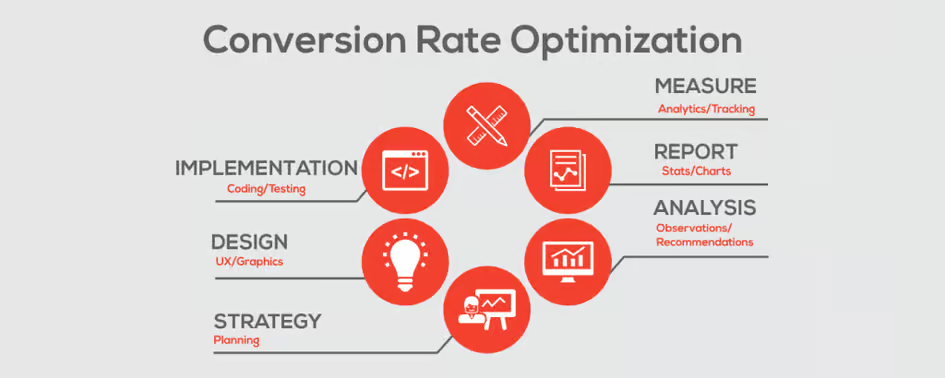
Your homepage is your digital storefront. If it doesn’t hook your visitors instantly, they’re gone.
Above-the-Fold Elements
Above-the-fold content is what visitors see without scrolling. It should include:
- A bold headline
- A clear CTA button
- A compelling hero image
- Your core value proposition
Make it count.
Crafting a Powerful Value Proposition
Your value proposition should answer one question:
“Why should I choose you over everyone else?”
Keep it short. Keep it impactful.
Using High-Quality Visuals
Low-quality images kill conversions. Use crystal-clear visuals that align with your message.
Best Practices for Images and Videos
- Use compressed images to avoid slow load times
- Add alt-text for SEO
- Use videos only if they don’t slow the page
- Ensure visuals reflect your brand identity
Building User-Friendly Navigation
Simple and Clear Menu Structure
Visitors shouldn’t struggle to find what they need. Keep your menu:
- Simple
- Descriptive
- Organized
Avoid having more than 6 main menu items.
Using Breadcrumbs and Internal Linking
Internal links not only help users navigate—they boost your SEO. Breadcrumbs also create a structured browsing experience.
Latest Post


Optimizing Content for Conversions
Writing Engaging Headlines
Your headlines should grab attention instantly. Use strong verbs and emotional triggers.
Creating Persuasive Call-to-Actions (CTAs)
Your CTA buttons should stand out. Use action-driven text like:
- “Get Started”
- “Buy Now”
- “Book Free Call”
Adding Trust Elements
Consumers trust real proof. Add:
- Testimonials
- Case studies
- Social proof badges
- Verified reviews
These elements massively boost conversions.
Improving Page Speed and Mobile Optimization
Why Speed Matters
Slow sites lose customers. A one-second delay can reduce conversions by up to 20%.
Weebly Tools for Mobile Optimization
With Weebly’s responsive templates, your site automatically fits mobile screens. Still, check each page manually for:
- Button spacing
- Font readability
- Image alignment
SEO Optimization for Higher Visibility

On-Page SEO with Weebly
Weebly provides built-in tools to edit:
- Page titles
- Meta descriptions
- Header tags
Use these wisely.
Using Alt Text, Meta Descriptions & URLs
Make sure each image has alt text. Keep URLs short and keyword-rich.
Keyword Placement for Better Rankings
Place keywords in:
- Headlines
- First paragraph
- Image alt text
- Meta tags
- URLs
But avoid keyword stuffing.
Integrating Must-Have Features for Better Conversions
Contact Forms
Make it easy for visitors to reach you. A simple form can dramatically increase leads.
Live Chat Integrations
Real-time support increases trust and reduces bounce rates.
Email Marketing Tools
Integrate tools like:
- Mailchimp
- Constant Contact
- Weebly Promote
These help nurture leads effortlessly.
Setting Up Analytics and Tracking
Using Weebly Stats
Weebly’s built-in stats give you data on:
- Traffic
- Popular pages
- Visitor behavior
Integrating Google Analytics & Search Console
For deeper insights, connect:
- Google Analytics
- Google Search Console
These tools help track performance and improve rankings.
Read More:-
How RNG INTERNATIONAL, INC. Leads the Global Trade Industry
Why Jackery US Is the #1 Choice for Portable Power Solutions
Benefits of Choosing Rapid STD Testing for Early Detection
Earth Breeze Review: Do These Eco-Friendly Sheets Really Work?
Why Anker | Fantasia Trading LLC Leads the Tech Accessories Market
Testing and Improving Your Website Continuously
A/B Testing Basics
Test two versions of a page and keep the one that performs best.
Heatmaps and User Behavior Insights
Use tools like Hotjar or Crazy Egg to understand what visitors click, ignore, or skip.
Common Mistakes to Avoid
Overloading Pages
Too many elements overwhelm users. Keep it clean.
Ignoring Mobile Users
Most traffic is mobile. Prioritize mobile optimization.
Weak CTAs
Your call-to-action should be bold, visible, and compelling.
Conclusion
Building a high-converting website on Weebly doesn’t require technical skills—it requires strategy. By focusing on design, user experience, content, SEO, and constant testing, you can create a site that doesn’t just LOOK good but actually brings in leads, customers, and revenue. With Weebly’s powerful tools and the right approach, your website can become a conversion powerhouse.
FAQs
Q. Is Weebly good for beginners?
A. Yes, Weebly is one of the easiest drag-and-drop builders, perfect for beginners.
Q. Can I build an ecommerce website on Weebly?
A. Absolutely. Weebly supports full ecommerce features like carts, payments, and product pages.
Q. How can I improve my Weebly website’s SEO?
A. Use proper keywords, optimize meta tags, compress images, and build internal links.
Q. Are Weebly templates mobile-friendly?
A. Yes, all Weebly templates are responsive and look great on mobile devices.
Q. How do I increase conversions on my website?
A. Use strong CTAs, add trust elements, improve page speed, and design a clear homepage.