Teamwork is a powerful project management software designed specifically for agencies that handle multiple clients, projects, and deadlines. This blog post, “Teamwork Review: Project Management Software for Agencies,” explores how Teamwork helps agencies streamline workflows, track time, manage client collaboration, and improve overall productivity. From task management to billing and reporting, Teamwork offers an all-in-one solution that supports agency growth while keeping projects organized and profitable.
Table of Contents
- Introduction to Teamwork
- Why Agencies Need Specialized Project Management Tools
- What Makes Teamwork Different
- What Is Teamwork?
- Key Features of Teamwork
- Teamwork for Agencies
- User Interface and Ease of Use
- Integrations and Compatibility
- Pricing Plans and Value for Money
- Pros and Cons of Teamwork
- Teamwork vs Competitors
- Real-World Use Cases
- Security and Data Protection
- Customer Support and Resources
- Final Verdict
- Conclusion
- FAQs
Introduction to Teamwork
Let’s be honest—running an agency without a solid project management tool is like juggling flaming torches while riding a unicycle. Something is bound to go wrong. Deadlines slip, tasks get lost, and communication becomes messy. That’s exactly where Teamwork steps in.
Agencies don’t just manage projects; they manage people, time, budgets, and clients—often all at once. This is why generic task tools usually fall short.
Why Agencies Need Specialized Project Management Tools
Agencies deal with multiple clients, each with different expectations, timelines, and billing models. A simple to-do list won’t cut it. You need visibility, accountability, and control—without micromanaging.
What Makes Teamwork Different
Unlike many project management tools that focus only on tasks, Teamwork is built with agencies in mind. It combines project planning, time tracking, client collaboration, and reporting in one ecosystem.
What Is Teamwork?
Teamwork is a powerful project management platform developed by Teamwork, designed to help agencies plan projects, manage workloads, track time, and collaborate with clients effortlessly.
Overview of Teamwork Project Management Software

At its core, Teamwork helps teams organize work into projects, break them down into tasks, assign responsibilities, and track progress in real time. But it doesn’t stop there—it adds layers of financial tracking and client transparency that agencies love.
Who Is Teamwork Best Suited For?
- Digital marketing agencies
- Web development firms
- Creative studios
- Consulting agencies
- Growing service-based businesses
If your business bills clients for time or deliverables, Teamwork feels like it was built just for you.
Key Features of Teamwork
Task and Workflow Management
Teamwork lets you create tasks, subtasks, milestones, and dependencies. Think of it as turning a messy brainstorming session into a clear roadmap. You can visualize workflows using lists, boards, or timelines—whatever fits your style.
Time Tracking and Billing
This is where Teamwork really shines for agencies. Built-in time tracking allows team members to log hours directly against tasks. Those hours can then be converted into billable invoices. No more guessing where the time went.
Client Collaboration Tools
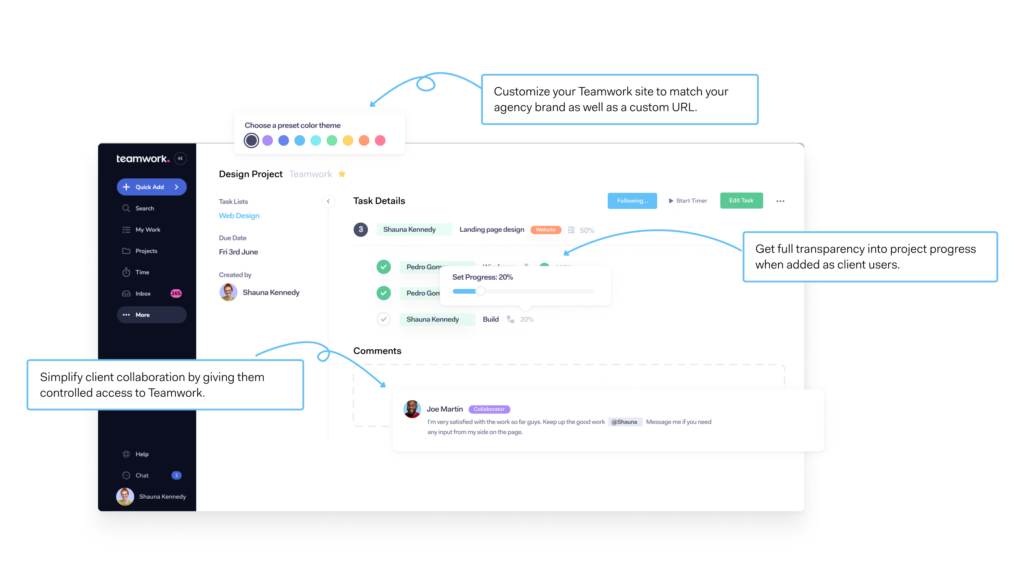
Want to keep clients in the loop without giving them full access? Teamwork allows you to invite clients as collaborators with limited permissions. They can view progress, comment on tasks, and share files—without breaking anything.
Reporting and Analytics
From workload reports to time usage and profitability, Teamwork gives you data that actually means something.
Custom Dashboards
You can create dashboards tailored to your role—project manager, team lead, or agency owner—so you see what matters most at a glance.
Read More:-
Omnisend Review: Email and SMS Marketing for E-Commerce
Bright Data Review: Web Data Collection for Businesses
Restream Features That Boost Audience Engagement
How Restream Helps Brands Grow on Multiple Platforms
Apollo.io Review: Lead Generation Tool for Sales and Marketing
Teamwork for Agencies

Managing Multiple Clients with Ease
Each client gets their own project space. This keeps communication clean and prevents the classic “Oops, wrong client” mistake.
Improving Team Accountability
When tasks, deadlines, and responsibilities are visible, accountability naturally improves. No awkward follow-ups needed.
Role-Based Permissions
Control who sees what. Designers don’t need financial data, and clients don’t need internal notes. Teamwork makes permission management simple.
User Interface and Ease of Use
Learning Curve
Teamwork is powerful, so yes—there’s a bit of a learning curve. But once you get the hang of it, everything clicks.
Navigation and Design
The interface is clean, professional, and logically structured. It feels like a tool made for adults who actually work under pressure.
Integrations and Compatibility
Popular Integrations
Teamwork integrates with tools like Slack, Google Drive, HubSpot, QuickBooks, and more. This means less switching between apps and more actual work getting done.
API and Custom Integrations
For tech-savvy teams, Teamwork’s API allows custom workflows and deeper automation.
Pricing Plans and Value for Money
Free vs Paid Plans
Teamwork offers a free plan for small teams, but agencies will benefit most from paid plans that unlock time tracking, billing, and advanced reporting.
Is Teamwork Worth the Price?
If you bill clients, absolutely. The insights alone can help you identify unprofitable projects and improve margins.
Pros and Cons of Teamwork
Advantages
- Built specifically for agencies
- Excellent time tracking and billing
- Strong client collaboration
- Powerful reporting tools
Disadvantages
- Slight learning curve
- Can feel overwhelming for very small teams
Teamwork vs Competitors
Teamwork vs Asana
Asana is great for task management, but it lacks deep time tracking and billing features. Teamwork wins for agencies.
Teamwork vs Monday.com
Monday.com excels in visual workflows, but Teamwork offers better financial and client management.
Why Agencies Prefer Teamwork
Because it understands agency life—deadlines, billable hours, and client expectations.
Real-World Use Cases
Digital Marketing Agencies
Track campaigns, log billable hours, and report results—all in one place.
Creative and Design Teams
Manage revisions, approvals, and client feedback without endless email threads.
Security and Data Protection
Compliance and Privacy
Teamwork follows industry-standard security practices, including data encryption and secure access controls.
Backup and Reliability
Your data is backed up regularly, so you can sleep better at night.
Latest post




Customer Support and Resources
Support Channels
Email support, live chat, and responsive help teams make onboarding smoother.
Knowledge Base and Tutorials
Teamwork offers detailed guides, videos, and webinars to help teams get the most out of the platform.
Final Verdict
Should You Choose Teamwork?
If you run an agency and want better control over projects, time, and profitability, Teamwork is a smart investment. It’s not just a project management tool—it’s an agency operating system.
Conclusion
Teamwork stands out as a project management solution built specifically for agencies that juggle clients, deadlines, and billable hours daily. While it may take a little time to master, the payoff is better organization, improved profitability, and happier clients. If you’re serious about scaling your agency without chaos, Teamwork deserves a spot in your toolkit.
FAQs
Q. Is Teamwork suitable for small agencies?
A. Yes, especially small agencies planning to scale and needing time tracking and client management.
Q. Does Teamwork support invoicing?
A. Yes, logged time can be converted into invoices, making billing easier.
Q. Can clients access Teamwork projects?
A. Absolutely. You can invite clients with limited permissions.
Q. Is Teamwork better than Asana for agencies?
A. For agencies that bill clients, Teamwork is usually the better choice.
Q. Does Teamwork offer a free trial?
A. Yes, Teamwork offers a free plan and trial options for paid features.