
Discover how Beaver Builder transforms website creation with its powerful drag-and-drop functionality, responsive design tools, and SEO-friendly structure. In this blog post, “Beaver Builder: Your Blueprint to Website Success,” you’ll learn how Beaver Builder helps beginners, businesses, and agencies build professional WordPress websites quickly and efficiently without coding.
Table of Contents
- Introduction to Beaver Builder
- Understanding Beaver Builder
- Key Features That Make Beaver Builder Stand Out
- Beaver Builder vs Other Page Builders
- Who Should Use Beaver Builder?
- Benefits of Using Beaver Builder
- Step-by-Step Guide to Getting Started
- Beaver Builder for SEO Success
- Pricing and Plans
- Common Mistakes to Avoid
- Real-World Use Cases
- Tips to Maximize Beaver Builder
- Future of Beaver Builder
- Conclusion
- FAQs
Introduction to Beaver Builder
Let’s be honest. Building a website used to feel like constructing a house with bare hands. You needed coding knowledge, patience, and a lot of coffee. But today? Tools like Beaver Builder have changed the game entirely.
What Is Beaver Builder?
Beaver Builder is a powerful drag-and-drop page builder plugin designed specifically for WordPress. It allows you to create beautiful, professional websites without writing a single line of code.
Think of it as your website’s architectural blueprint. Instead of coding bricks one by one, you simply drag elements into place and design visually.
Why Website Builders Matter in 2026
In 2026, speed matters. Attention spans are shorter. Competition is fierce. You can’t afford a clunky, outdated website. A builder like Beaver Builder helps you launch quickly while maintaining professional quality.
Understanding Beaver Builder

Core Features at a Glance
Here’s what makes Beaver Builder powerful:
- Visual front-end editing
- Drag-and-drop modules
- Responsive design tools
- Clean code structure
- Template library
- WooCommerce compatibility
Simple. Powerful. Reliable.
How Beaver Builder Works with WordPress
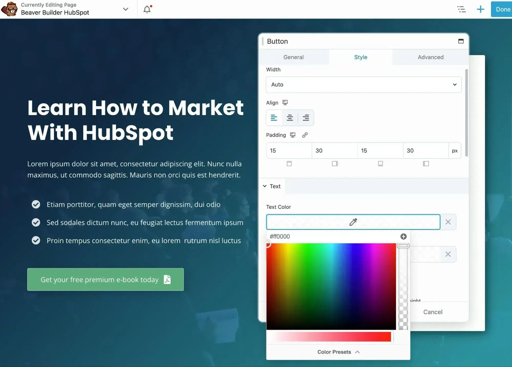
Beaver Builder integrates seamlessly with WordPress. Once installed, it adds a visual builder interface to your pages and posts. You click “Page Builder,” and suddenly your screen transforms into a live editing playground.
Front-End Editing Explained
Unlike traditional editing, you see changes instantly. No guessing. No refreshing. What you see is exactly what visitors will see. It’s like painting directly on the wall instead of imagining how it might look.
Key Features That Make Beaver Builder Stand Out
Drag-and-Drop Page Builder
Drag. Drop. Done.
Want a heading? Drag it in. Need a button? Drop it where you want. This simplicity is why many professionals trust Beaver Builder.
Pre-Made Templates
Don’t want to start from scratch? Choose from ready-made templates for landing pages, portfolios, businesses, and blogs.
Templates save time and give you structure—like using a blueprint before building a house.
Responsive Design Controls
Your site must look good everywhere—mobile, tablet, desktop.
Beaver Builder gives you full responsive control so you can adjust spacing, font size, and layout per device.
Custom Modules and Widgets
Need advanced functionality? Add sliders, testimonials, forms, pricing tables, and more. Everything is modular.
Developer-Friendly Framework
For developers, Beaver Builder offers extendability. You can create custom modules and integrate advanced functionality easily.
Beaver Builder vs Other Page Builders
Comparison with Elementor
Elementor is popular and feature-rich. But sometimes, more features mean more complexity. Beaver Builder focuses on stability and clean code.
Comparison with Divi
Divi offers built-in themes and flashy designs. However, Beaver Builder is often praised for reliability and performance.
Why Simplicity Wins
Sometimes less is more. Beaver Builder avoids unnecessary clutter and keeps your workflow smooth.
Who Should Use Beaver Builder?
Bloggers
Want a stunning blog layout without coding headaches? Beaver Builder makes customization effortless.
Small Business Owners
Need a professional website quickly? You can build service pages, contact forms, and testimonials in hours.
Agencies and Freelancers
Agencies love Beaver Builder because it allows reusable templates and fast deployment.
eCommerce Store Owners
With WooCommerce compatibility, you can design product pages that convert visitors into buyers.
Benefits of Using Beaver Builder
Time Efficiency
Time is money. Beaver Builder drastically reduces development time.
SEO-Friendly Structure
Clean code means better crawling and indexing. Combined with SEO plugins, your rankings can improve significantly.
Clean Code Output
Unlike some heavy builders, Beaver Builder is known for generating relatively clean markup.
Scalability and Flexibility
Start small. Scale big. Beaver Builder grows with your business.
Latest Post




Step-by-Step Guide to Getting Started
Installing Beaver Builder
- Purchase the plugin.
- Upload it to WordPress.
- Activate it.
- Enter your license key.
That’s it.
Creating Your First Page
- Click “Add New Page.”
- Select “Launch Beaver Builder.”
- Choose a template or start blank.
- Drag modules into place.
Customizing Layouts
Adjust spacing, colors, typography, and images. Make it yours.
Publishing and Optimizing
Once satisfied, hit publish. Then optimize images and enable caching for better performance.
Beaver Builder for SEO Success

Mobile Optimization
Google prioritizes mobile-first indexing. Beaver Builder helps you design mobile-ready layouts effortlessly.
Page Speed Performance
While no builder is zero-weight, Beaver Builder maintains strong performance when optimized correctly.
Schema and Integrations
You can integrate SEO tools like Rank Math or Yoast to enhance metadata and schema markup.
Pricing and Plans
Overview of Plans
Beaver Builder offers multiple pricing tiers depending on your needs—Standard, Pro, and Agency plans.
Is It Worth the Investment?
If you value stability, clean code, and professional design, the investment pays off quickly.
Common Mistakes to Avoid
Overusing Modules
Too many animations and elements slow down your site. Keep it clean.
Ignoring Performance Settings
Always optimize images and enable caching plugins.
Read More:-
Transistor Podcast Hosting: Your Pathway to Audience Engagement
How Many Products Does Spocket Dropshipping Have?
How Does Spocket Dropshipping Work?
How Can Spocket Help You Compete in the E-commerce Space?
The Ultimate Guide to Shift Browser Managing Solutions
Real-World Use Cases
Portfolio Websites
Showcase your work beautifully.
Corporate Sites
Build structured pages with consistent branding.
Landing Pages
Create high-converting landing pages with clear CTAs.
Tips to Maximize Beaver Builder
Combine with SEO Plugins
Use SEO plugins for metadata and structured data.
Use Global Templates
Save sections and reuse them across pages.
Optimize Images and Assets
Compressed images mean faster loading times.
Future of Beaver Builder
Trends in WordPress Page Building
As WordPress evolves, builders are focusing more on performance and block-based editing.
Updates and Community Support
Beaver Builder has a loyal community and consistent updates, ensuring long-term reliability.
Conclusion
Building a website doesn’t have to feel overwhelming. With Beaver Builder, you get a reliable, flexible, and powerful tool that turns complex design into a smooth experience.
It’s like having a professional architect guiding your website’s construction—without the massive bill. Whether you’re a beginner or a seasoned developer, Beaver Builder gives you control, speed, and stability.
If website success had a blueprint, this would be it.
FAQs
Q. Is Beaver Builder good for beginners?
A. Yes. Its drag-and-drop interface makes it extremely beginner-friendly.
Q. Does Beaver Builder slow down websites?
A. Not significantly, especially when combined with caching and optimization plugins.
Q. Can I use Beaver Builder with any theme?
A. Yes, it works with most WordPress themes.
Q. Is Beaver Builder good for SEO?
A. Yes. Its clean code structure supports SEO best practices.
Q. What makes Beaver Builder different?
A. Stability, simplicity, and developer-friendly flexibility set it apart.